%20(1).png)
c-entron Release v2.0.2501.77 - English
Once it has been uploaded, this one can be https://c-ftp.de/wl/?id=gmMD9VSCHVkR0dflrSYuuD8hE6gsD3gI be downloaded.
The following adjustments were made in this version:
Important information about ZUGFeRD and X-Rechnung settings
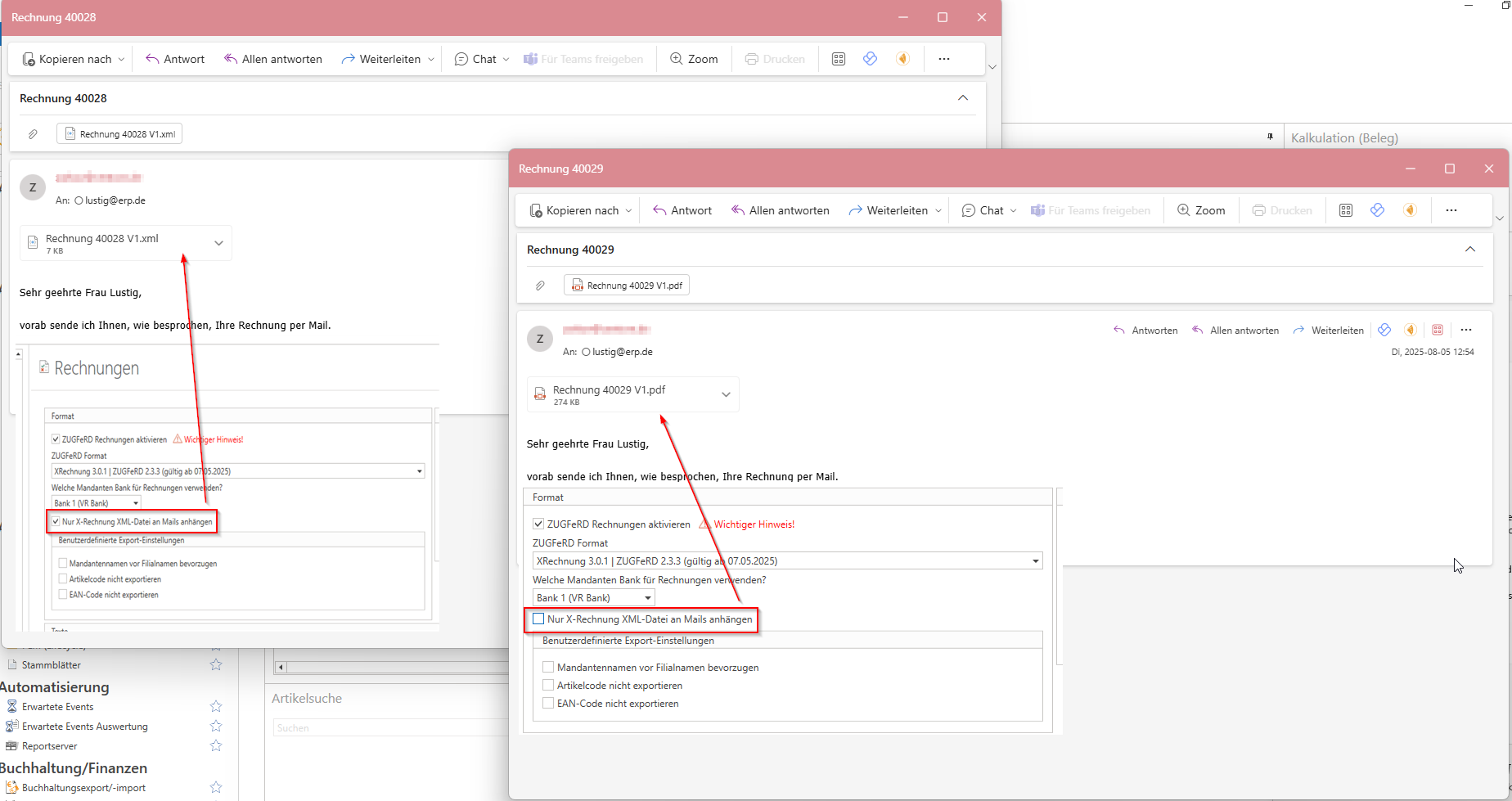
Basically, there has been no change in ZUGFeRD nothing has changed—only the name of the corresponding setting has been adjusted.
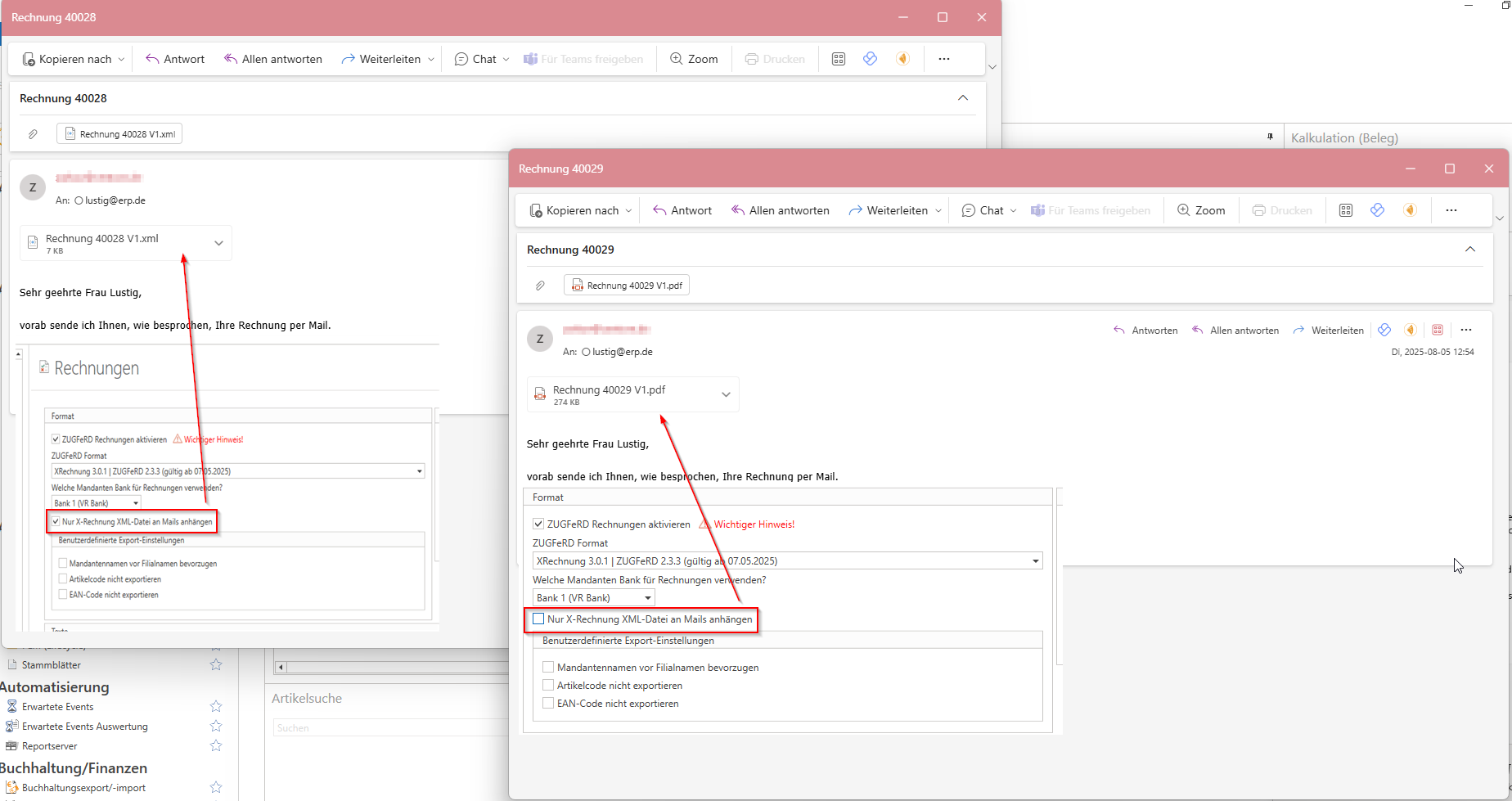
This setting allows you to either:
that XML document to attach (in the case of a X-bill), or
that PDF document with embedded XML file (at ZUGFeRD).
Important configuration steps
Enable setting:
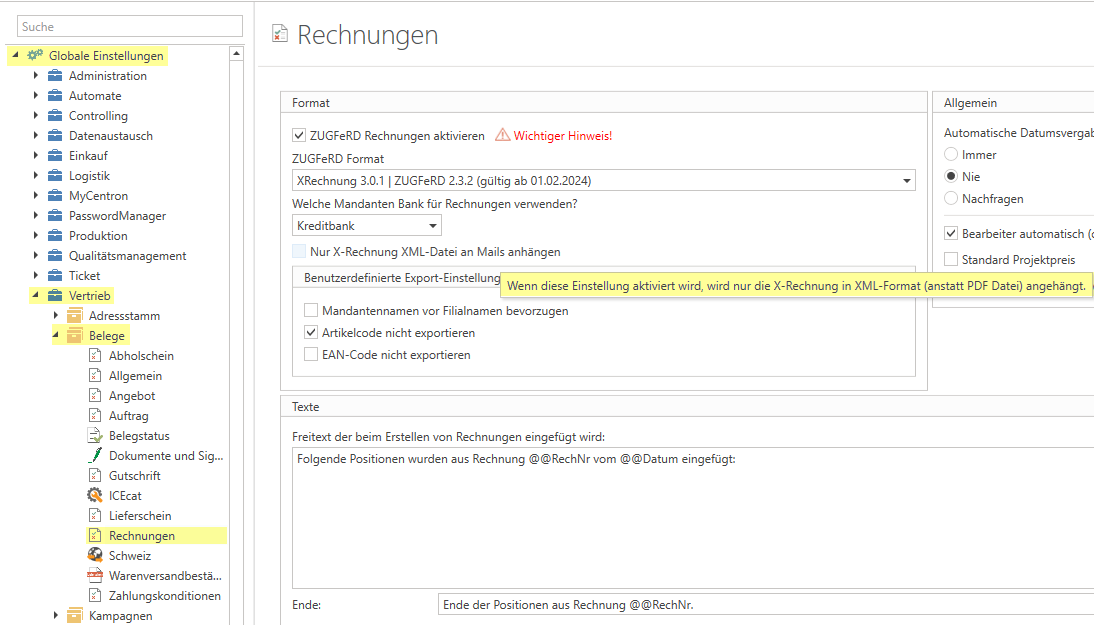
Select current format – currently "XRechnung 3.0.1|ZUGFeRD 2.3.2 (valid from February 1, 2024)“
Determine which Client database can be used. These can be stored in client management.
Decide whether, in the case of a X-bill only the XML file should be sent by email.
Adjust document conditions:

In the used Payment terms the code "UNTDID 4461" the code to be entered here describes the payment method. The search button (magnifying glass) indicates the official website.
Check country configuration:
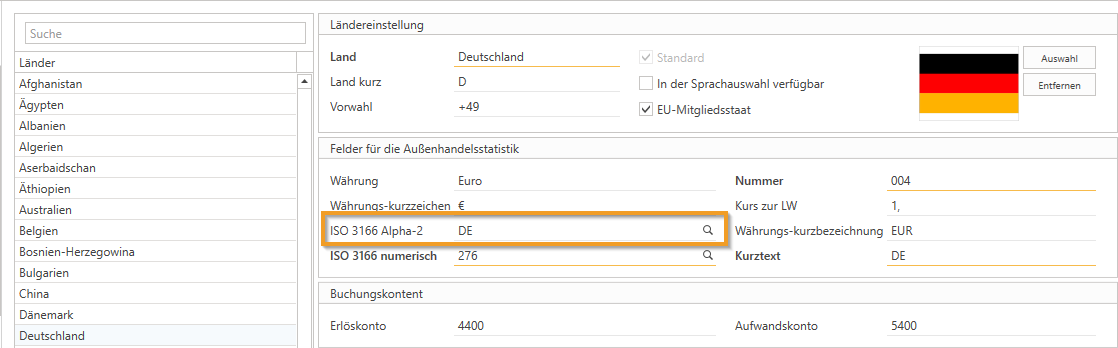
Ensure that the correct ISO 3166 Alpha-2 Code stored
Address master settings:

In the tab "Finance" check whether a Route ID was deposited:
If so → A X-bill created.
If not → A ZUGFeRD document generated.
New
CRM projects
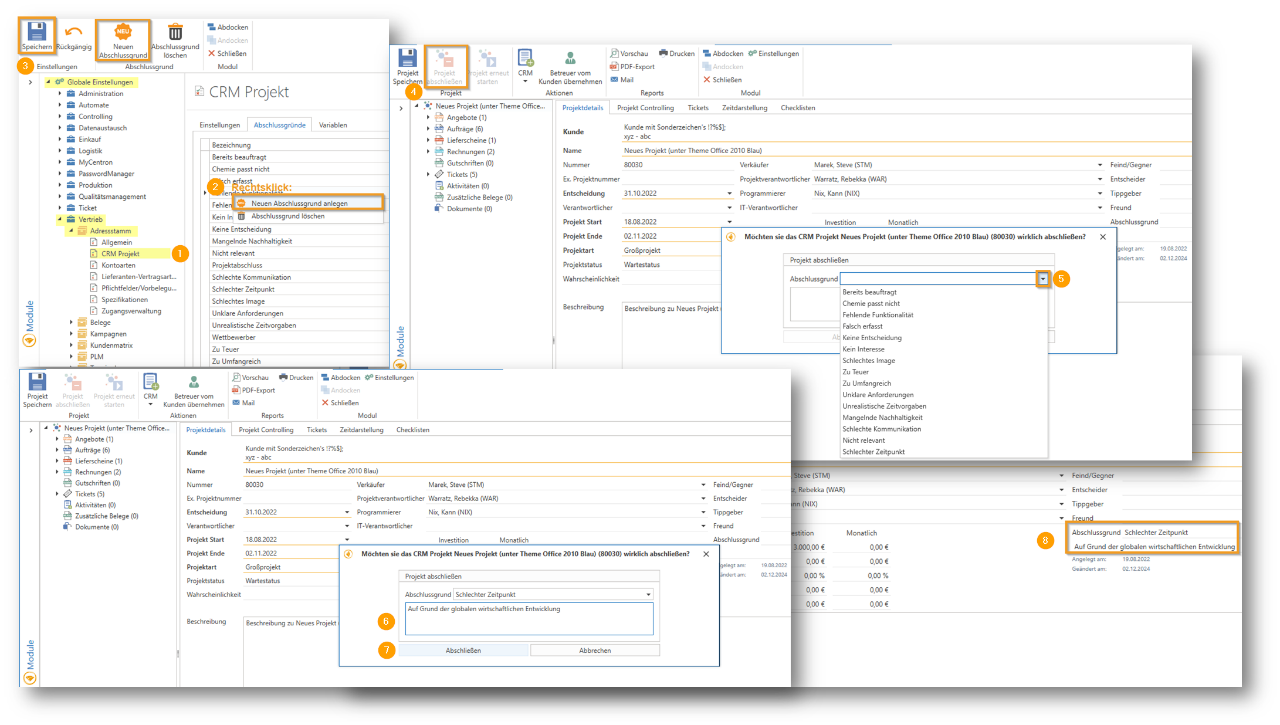
You now have the option to choose from predefined completion reasons such as "Already commissioned," "Not interested," or "Too expensive," and add your own reasons. When completing a CRM project, a dialog box appears for selecting a completion reason with the option to add a short description, which is then visible in the open project. This feature enables flexible and structured management of completed CRM projects.
Settings
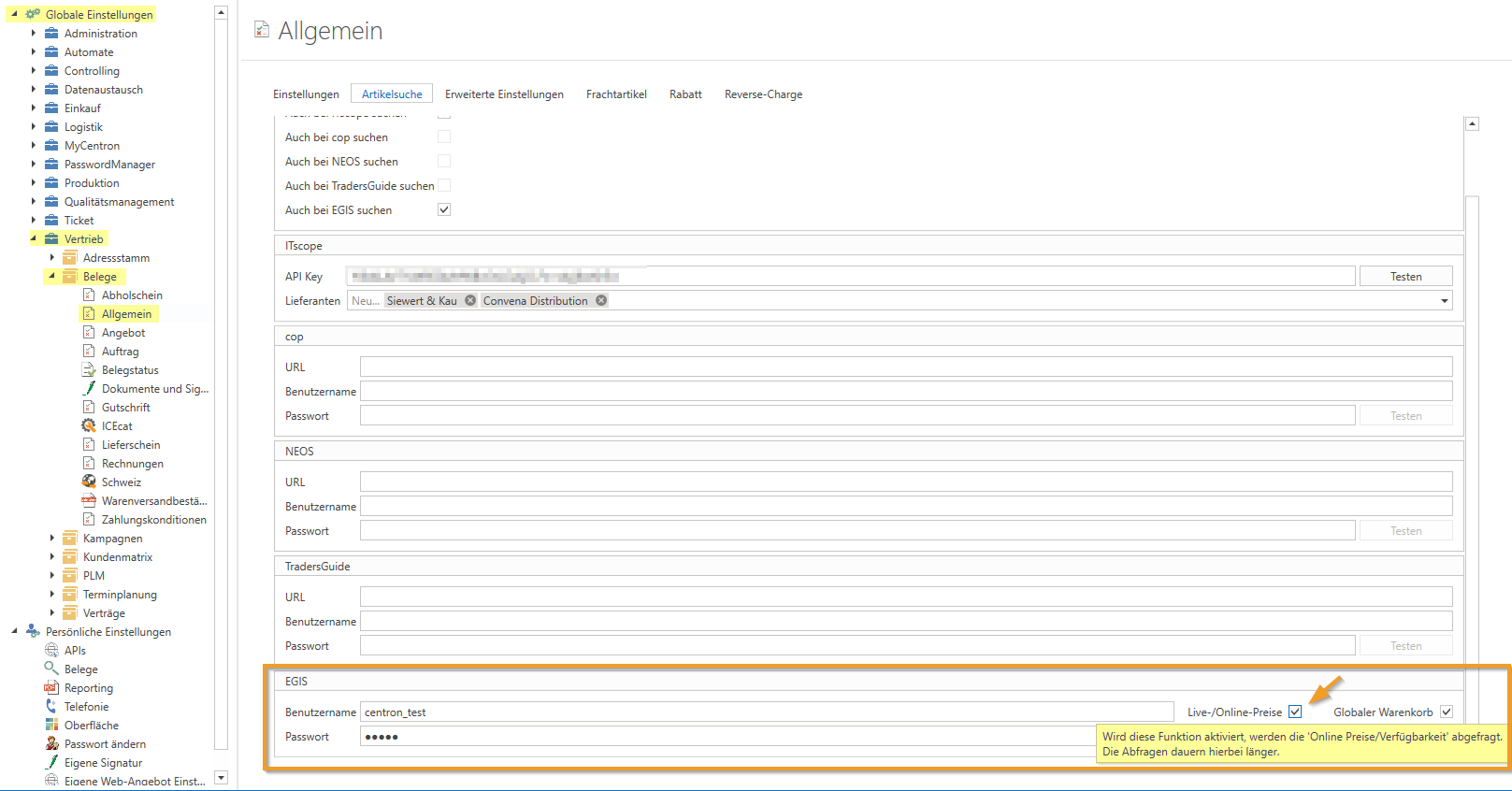
Under Global Settings – Sales – Documents – General, there is a new setting called "Live/Online Prices" in the "Item Search" tab. If this function is activated, the "Online Prices/Availability" will be queried. These queries take longer.
Payment transactions
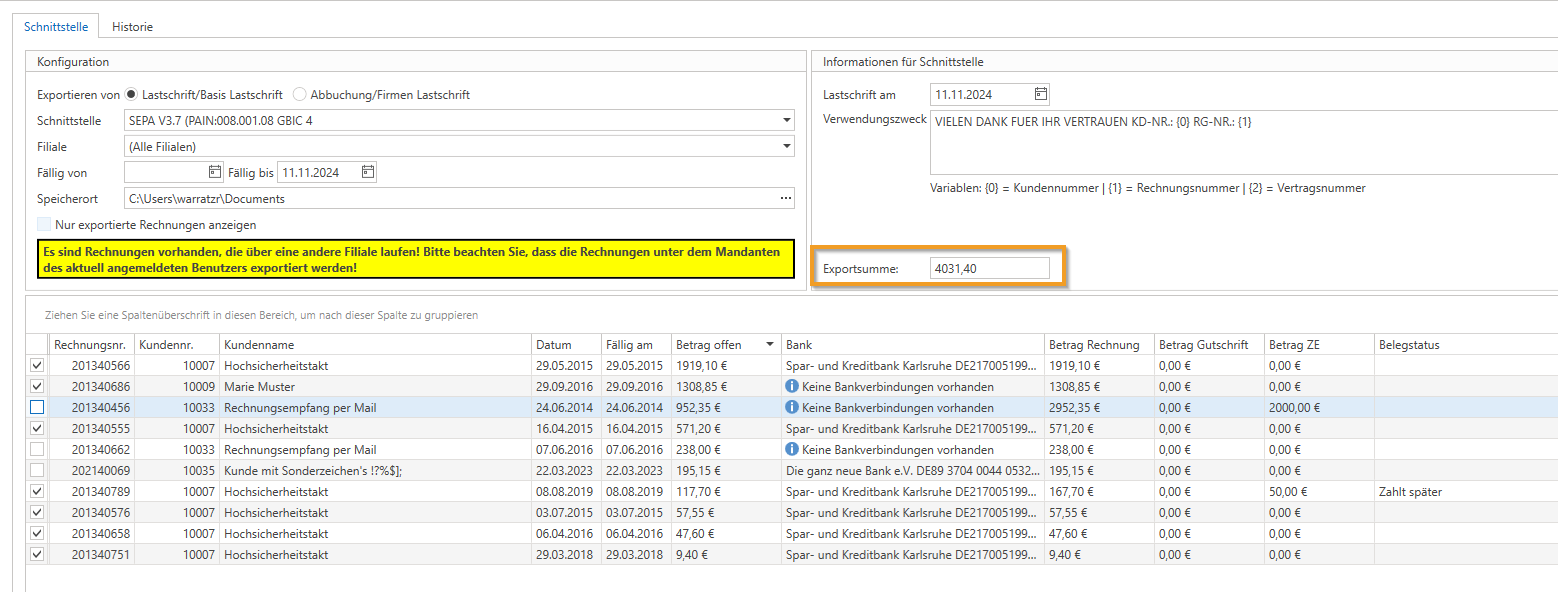
The "Export total" field has been added to the "SEPA" module, which displays the total amount of the selected invoices to be exported. This provides a better overview of the amount to be exported.
Improvements
Documentation
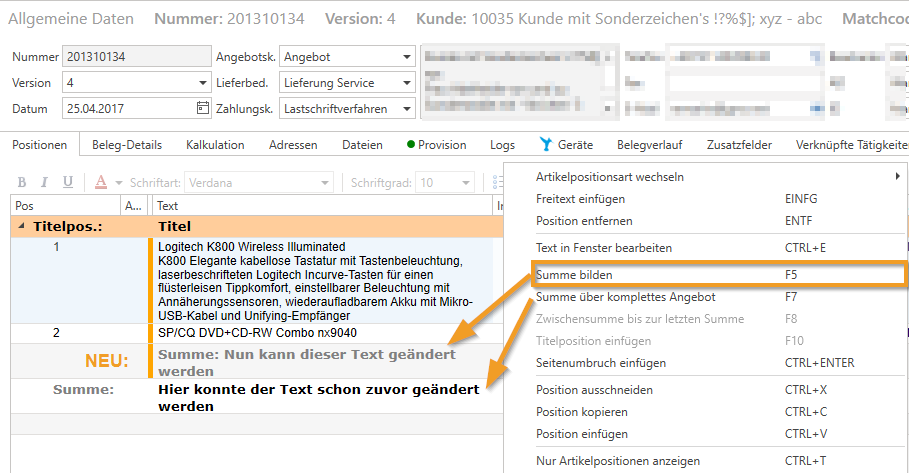
With the "Calculate total" function (F5) in document management in the address master, it is now possible to change the text in the "Total:" total item.
Supplier documents
It is now possible to add new items to goods receipts, GR calculations, and supplier credit memos.
Fixed bugs
Address master/report management
If a different invoice report for printing, faxing, or emailing has been stored in the address master for a customer under print options, this setting is now correctly taken into account when sending the invoice.
The message "String or binary data would be truncated in table 'centron.dbo.AccountCustomers', column 'LeitweglD'", which could occur when saving an account after inserting a routing ID, has been fixed. The maximum field length for the routing ID has been extended to 50 characters.
Article import
If the file from the manufacturer, which is downloaded via the "Download" button, is empty in the article import, the following message now appears: "The file 'xy.csv' is empty."
The error message in article import: "LoadArticleImports: could not execute query" has been fixed.
Item management
When you click on "Edit overview" in the item management section and select "Set/remove marked items to EOL" from the right-click menu, the changes are now saved correctly. If both items already set to EOL and items not set to EOL are selected, a message appears. Here you can decide whether to set or remove EOL for all selected items or whether you want to cancel the process.
The error message "Value cannot be null. (Parameter 'source')", which could occur when saving or creating an article, has been identified and fixed.
Audit
It is now possible to remove (using CTRL + Del) a category from a building block in the audit. The message: "ArgumentOutOfRangeException: Index was out of range. Must be non-negative and less than the size of the collection. (Parameter 'index')." no longer appears.
BVL
If an item is selected in BVL and "New Egis Shopping Cart" is chosen, the following message may appear: "Logic 'ISupplierEdiLogic' returned an error on method 'CreateEgisShoppingCart'. The message is 'Object reference not set to an instance of an object.'" From now on, the EGIS error message will be displayed directly here, e.g., in the event of missing authorization or an incorrect login.
c-entron Inspector
The c-entron Inspector Check "Check rich text in contract items" has now been expanded. In addition to the previous master sheet items, article items where the rich text is incorrectly empty can now also be corrected.
There is now a new inspector check "Changed times through graph" to check and correct the calendar sync error.
The correction is made exclusively on "not charged" Times. The system checks whether the current start/stop time or duration has changed since the last change non-CenSu users differs. If this is the case, all unbilled time corrected accordingly. Times that have already been calculated remain unaffected and will not be changed.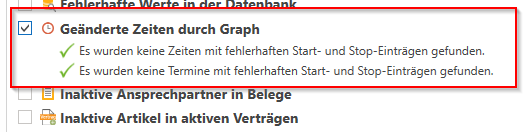
Checklists
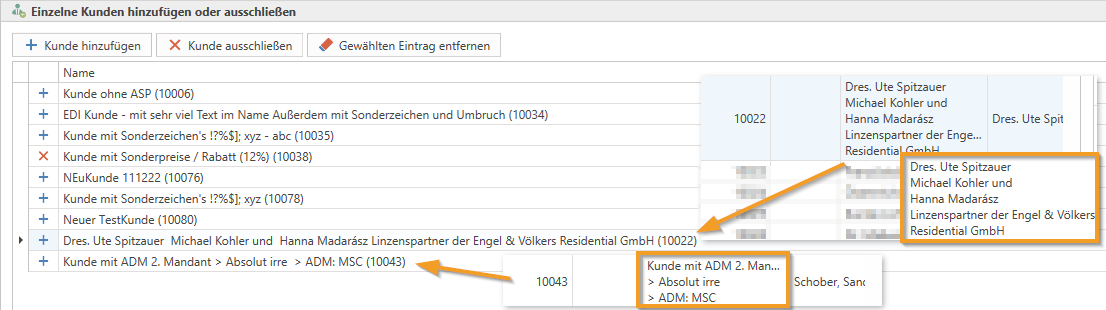
When creating a new customer-specific checklist, it could not be saved after adding the customer due to the customer name being too long. This issue has been resolved, and the name is no longer displayed in a heavily truncated form.
Dashboard
The dashboard containers have been optimized to achieve shorter loading times and improved caching for faster performance.
EDI
An error in EGIS-EDI regarding serial number assignment has been fixed.
Entrance/Lime
Manual entry of the invoice date in the "Incoming/Calculation" module at the bottom right has been simplified: instead of only being able to click in the corner, the date can now be entered directly in the entire input field.
In the dialog box that appears after selecting "Add orders to document" in the "Incoming/Calculation" module, a checkbox for displaying completed orders and a new column showing the current status of orders have been added.
In the "Incoming/Calculation" module, it is now possible to transfer a document to another supplier. This can be done either via the context menu (right-click) or via the new button in the menu bar "Transfer document to another supplier." A dialog box will appear with the question: "Do you really want to delete the document 'xy' including the email and all associated attachments from the original supplier?".
Settings
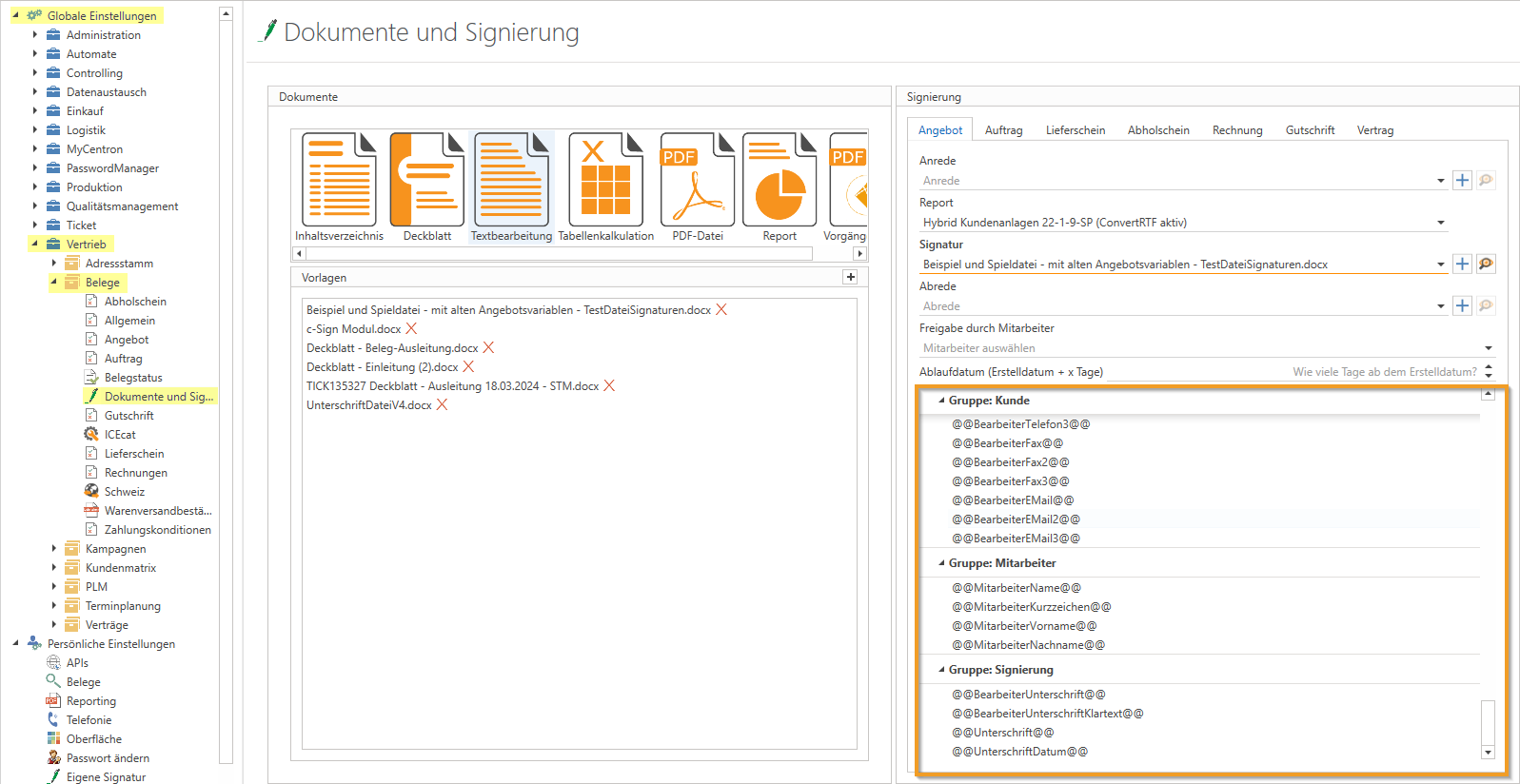
Templates under Global Settings - Sales - Documents - Documents and Signing can now be deleted if they are not used for a document type.
There is now an overview of the available variables under Global Settings - Sales - Documents - Documents and Signing. The following variables have been added: '@@CurrentDate@@', '@@CurrentTime@@' and '@@SignatureDate@@', as well as '@@ContractNo@@' and '@@ContractName@@' for contracts.
Reminder/OPOS
Both OPOS and the reminder module had a bug that restricted branch filter options based on the first search. This has been fixed.
MSP evaluation
In the MSP evaluation, it could happen that contracts were updated even though "ignore" was selected. This has been corrected.
MSP Collector
Alphanumeric customer numbers can now also be used in MSP Collector.
Office
If a document is removed from Global Settings under Sales → Documents → Documents and Signing, a message now appears. This message indicates in which documents with an active signing process or in signature templates the document is still contained. In the message, you can then decide whether to terminate the signing process and delete the document anyway.
RMA
The issue where saving an RMA return failed due to the error message "ResultException: Evaluation failure on null.I3D – Object reference not set to an instance of an object – SendBackViewModel" has been fixed.
(If a repair dummy item is sent to a distributor (i.e., the item is exchanged in the RMA module), an item selection dialog now appears. If no supplier is assigned, a dialog for supplier selection is now automatically displayed.)
Master sheet
In the master sheet, the "Info Short" is now displayed in multiple lines, or can be scrolled.
Task management
The problem that the error message "Object reference not set to an instance of an object" could occur in task management when quickly navigating through the taskbar with the arrow keys has been fixed.
Text modules
In text module management and when calling up text modules using the right mouse button in documents, the entries are now sorted alphabetically. This makes it easier to quickly find and use the desired text modules.
Ticket billing
The automatic master sheet assignment has been adjusted: For new times that have not yet been saved, a master sheet will continue to be preselected automatically. However, if the time has already been saved and is only being loaded, a master sheet will no longer be assigned automatically. In ticket billing, there is now a "Ticket Master Sheet" column (shows whether a master sheet is stored for the entire ticket) and a "Master Sheet" column (shows whether a master sheet is stored for the specific ticket time).
Contract settlement
The current "OpenTrans" format for the fixed interface configuration of "Wortmann" is now also available in dynamic import.
The c-entron Inspector Check "Check rich text in contract items" has now been expanded. In addition to the previous master sheet items, article items can now also be corrected if the rich text is incorrectly empty.
Contract management
If an additional field is defined for contracts and also defined as a mandatory field, this can now also be edited when creating a new contract under the "Additional fields" tab.
The termination type in the contract (which can be defined in the contract billing via the "Termination types" button) can now be removed by clicking on "New version" via the "x."
The date in the "Start of billing" and "End of billing" columns in the contract items is now displayed again in the format DD.MM.YY, both in the open contract in the "Items to be billed" tab and in the contract overview in the details area under the "Items" tab.
If the billing interval was changed in a new contract version, this value was also incorrectly updated in all previous versions. This behavior has now been corrected.
ZUGFeRD/XRechnung
Fields BT-73 and BT-74 have been added for xRechnung/ZUGFeRD, so that the billing period is now automatically exported for invoices from contract billing.
The message "String or binary data would be truncated in table 'centron.dbo.AccountCustomers', column 'LeitweglD'", which could occur when saving an account after inserting a routing ID, has been fixed. The maximum field length for the routing ID has been extended to 50 characters.
The ZUGFeRD interface has been revised, resulting in two changes to the export of addresses.
If a different billing address is activated, the name of the customer for this address is now loaded and exported.
Previously, invoices with a different delivery address exported this address, which was incorrect. Therefore, this part has been completely removed.
The setting "Attach ZUGFeRD invoices to emails" under "Sales -> Documents -> Invoices" has been renamed to "Only attach X-Invoice XML files to emails."
In addition, the behavior in the document overview in the right-click menu and when directly calling up the mail function in the invoice has been adjusted accordingly.