%20(1).png)
Address master – Partner management
(Available from release 2.0.2106.109)
This feature allows you to add partners to an account. These partners should be automatically added as CC email recipients for certain processes (CRM activities, quotes, and orders) when an email is sent.
When an account has been loaded into the address master, the new "Partner" tab appears in the Miscellaneous section.
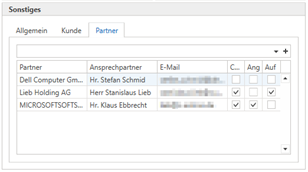
This is where partners are stored and managed for the account. Accounts that are used as partners appear as a preselection in the search. However, it is possible to store any account as a partner. Clicking on + or [Enter] opens a window where you can select the desired contact person.
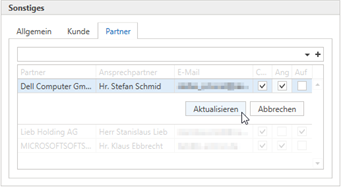
The listed partners can be removed or opened again via the right-click menu (double-clicking is also supported).
In the options (on the right side of the table), you can specify for which objects the contact person should be stored as a CC email recipient.
When an account is loaded that is stored as a partner in other accounts, an additional tab appears: "Is partner of."
This view allows you to see who the account is registered with as a partner and who the contact person is.
It is also possible to delete the partner assignment via this list.
(Starting with release v2.0.2107.1094)
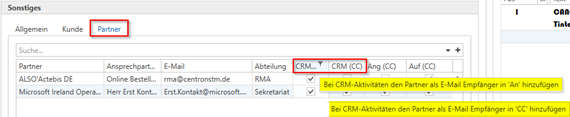
Improvements/changes have been made to partner management. The column names for the checkboxes have been changed to CRM (An), CRM (CC), Ang (CC), and Auf (CC), and BCC has been removed. The "Department" column has been added, and the columns in the partner list can now be selected.
(Starting with Service Pack 2.0.2111.280)
There is a new email template for CRM activities where you can set the subject line and body yourself.
The following variables were created in addition to the standard @@ variables:
@@FirstBodyLine@@ (replaced with the first body line)
@@Matchcode@@ (will be replaced with the customer's matchcode)
@@Customer name@@ (will be replaced with the customer's name)
@@Project number@@ (will be replaced with the project number)
@@Project name@@ (will be replaced with the project name)
partnerFirstNameMailTo (if partners have been stored who are to be notified of CRM activities, replace the variable accordingly)
partnerLastNameMailTo (if partners have been stored who are to be notified of CRM activities, replace the variable accordingly)
The variable @@BodyBis€€Trennzeichen@@ (replaced with the body text up to "€€" in the body text) was created in the mail template for CRM activities. Furthermore, the CRM email has been revised so that if there are other recipients through partner management, the "processor" of the activity is NOT written in the "To" field, but if a partner is available and "CRM (To)" and/or "CRM (CC)" is checked here, only one email is now created for the "To recipients." The CC recipients, etc., are only in CC, but do not receive their own email.
(Starting with release 2.0.2201.195)
Several improvements/corrections have been made in the area of CRM activities:
The partner list now saves the layout in the address master.
Three new fields for telephone number, occupation, and CRM (BCC) have been added to the partner list in the address master.
When the window for the CRM activity is closed, it now checks whether there are any unsaved changes.
The window for CRM activities now has an extra "Save and close" button. The "Save" button now only saves the changes without closing the window.
Sending mail from the CRM Activities window is only possible once the changes have been saved.
Corrected error in tickets with link numbers (but without status - value "NULL").
(Starting with release 2.0.2203.156)
Adjustments were made to the CRM activity and the mail template:
The partner was not entered in the BCC field when BCC was activated for mail delivery.
Due to an error, the matchcode variable may have been replaced with the wrong customer.
If multiple partners are set as "To recipients," they will now also be listed as To recipients in the email
To make it easier to customize the email template for recipients, two new @@variables have been added:
@@PartnerListMailTo@@ -> Here, [letter salutation] [name] is used
@@PartnerListYouSalutationMailTo@@ -> Here, Hello [first name] is used
The email template for CRM activities is now only used for the activity type "CRM." For phone notes, etc., the email is now structured as before
Partners will only be contacted for the email if it is a "CRM" CRM activity
In the address master, "Partner" has been renamed "CRM Partner" to better distinguish it from partner management in Service Board.