%20(1).png)
c-entron Inspector
This module is only visible to administrators
The "c-entron Inspector" module is used to continuously check the current configuration of c-entron. It is continuously expanded with additional test and SQL fix routines to ensure a comprehensive analysis of the system configuration.
The inspector performs various "checks" that either make corrections automatically or display a message indicating whether the configuration is OK or whether there are areas that need optimization. In cases where automatic repair is not possible, you will receive recommendations for improving your settings.
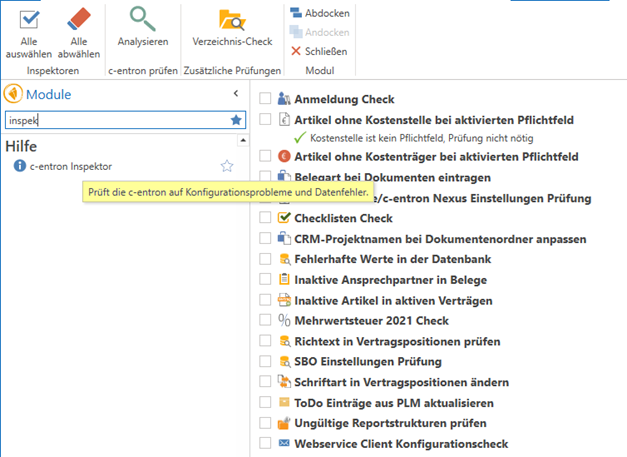
"c-entron Inspector" module
The module "c-entron Inspectoryou can find this in the modules under the "Help" section.
Rights
Note: Only "administrators" can access/open this module. Therefore, you must be assigned to the admin group in the rights management
Function
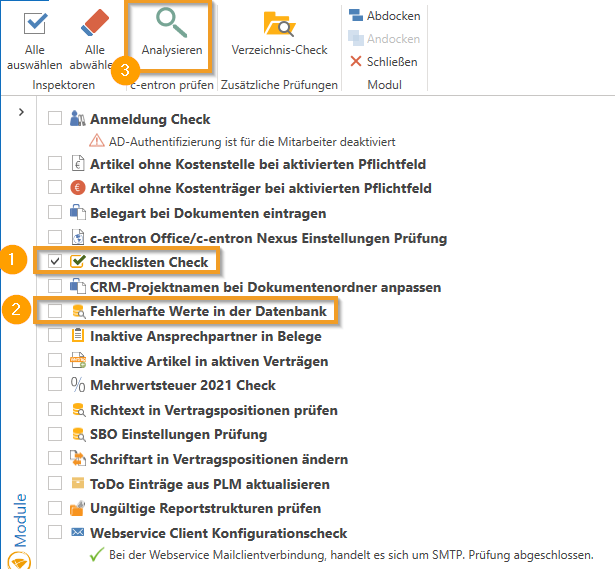
To run one or more checks in succession, select the desired check by placing a check mark in front of the corresponding entry. Then start the process by clicking on "Analyze."
Please note that depending on the number and type of checks selected, the process may take some time.
Available checks in v2.0.2012.x
(Available from version 2.0.2012.x)
Registration Check

Checked in the "Login Check" whether AD authentication is enabled or not.
Incorrect values in the database

If the client ID has a value of "zero" or "0," it will be suggested for repair.
Value added tax 2021 check

The "VAT 2021 Check" checks whether the 16% and 5% tax rates from 2020 will end on January 1, 2021, and whether there will be a follow-up VAT rate (16% -> 19% and 5% -> 7%)
"Directory check" button in the "c-entron Inspector" module
(Available from version 2.0.2101.x)
In the "c-entron Inspector" module, there is a new button [Directory Check] in the ribbon/menu bar under the "Additional Checks" group. Since this process can take a long time, it is best to run it outside of core working hours.
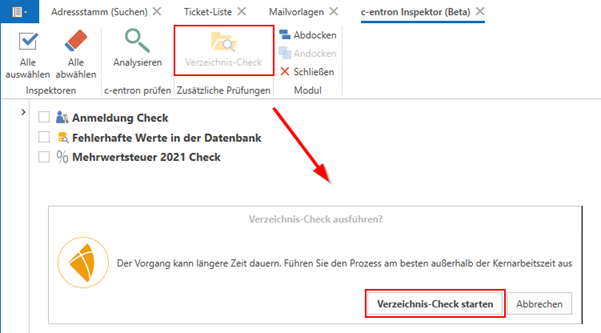
The following tests have been carried out here to date:
Customer master data:
- Checks at the level of the old structure whether root, ang, auf, etc. directories exist and creates them
- Checks whether the new structure has a reference to the RootVZ of the old structure and adjusts it accordingly
- Checks the structure for "Accounts" and creates it if it does not exist
Customer receipts:
- Checks customer documents (quotes, orders, etc.) and creates the VZ if it does not exist
Supplier master data:
- Analogous to "customer master data"
Supplier documents:
- Analogous to "customer receipts"
Article directories:
- If an item does not have a VZ, one will be created
- If an article VZ has the wrong "parent," it will be changed to the "article main folder."
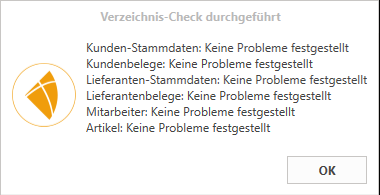
At the end, you will receive an information message telling you what needed to be corrected and/or what did not need to be corrected:
"Web service client configuration"
(available from v2.021111.188)

The DB check has been added to the c-entron Inspector "Web service client configuration" this checks whether Exchange is active, whether the URL is set, and whether an email address and password are stored in the "Default Exchange" fallback column. If anything is missing here (indicated by a red cross), it can be added and applied using the [Repair] button. The connection is then checked again and, if successful, marked with a green check mark.
check invalid report structures
(Available from v2.0.2201.215)

There is a new inspection in the c-entron Inspector check invalid report structureswhich can fix the errors with pgMain_dTitel_txtAnrede (if the report has already been overwritten, unfortunately it can no longer help).
"Checklists Conversion Check" expanded
(Available from v2.0.2203.156)

Checklist check built in, which checks the numbering. Using the [Repair] button, it fixes this by going through the incorrect checklists and standardizing the numbering to 1, 2, ... .
Checklist check built in to check whether there are any checklist templates that contain an incorrect status (these should all have the status "open" when inserted into a ticket). These can be corrected using the [Repair] button.
"Check rich text in contract items"
(Available from v2.0.2203.156)
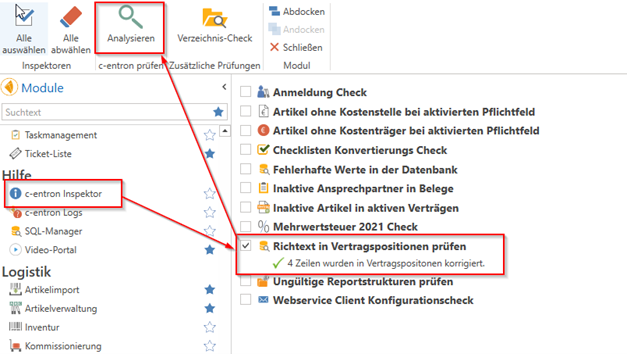
Activate the "Check rich text in contract items" option and start the process by clicking on "Analyze." (Depending on the number of contracts, this may take a moment.)
It then shows you how many positions have been corrected.
Now the item text should be displayed correctly (master sheet item text in the contract + "Item text for master sheet item in invoices")
"Customize CRM project names for document folders"
(available from v2.0.2309.118)

With a new check in the c-entron Inspector "Customize CRM project names for document folders" existing projects can also be automatically named according to this logic.
"Checklists Check" new analysis
(available from v2.0.2401.209)
A new analysis in the c-entron Inspector "Checklists Checkincorrect checklists can be reviewed and corrected.
Button "Customize CRM project name for document folder" revised
(Available from v2.0.2405.135)
In the c-entron Inspector, the script for the check "Customize CRM project names for document folders" revised.
Furthermore, there are many other checks and test routines that are continuously being integrated.