%20(1).png)
FAQ – Document template (quote template) cannot be moved to another folder
Question
Why can't a document template (quote template) be moved to a different folder?
Re:
📦 Sales
⚙️ Administration
Short answer
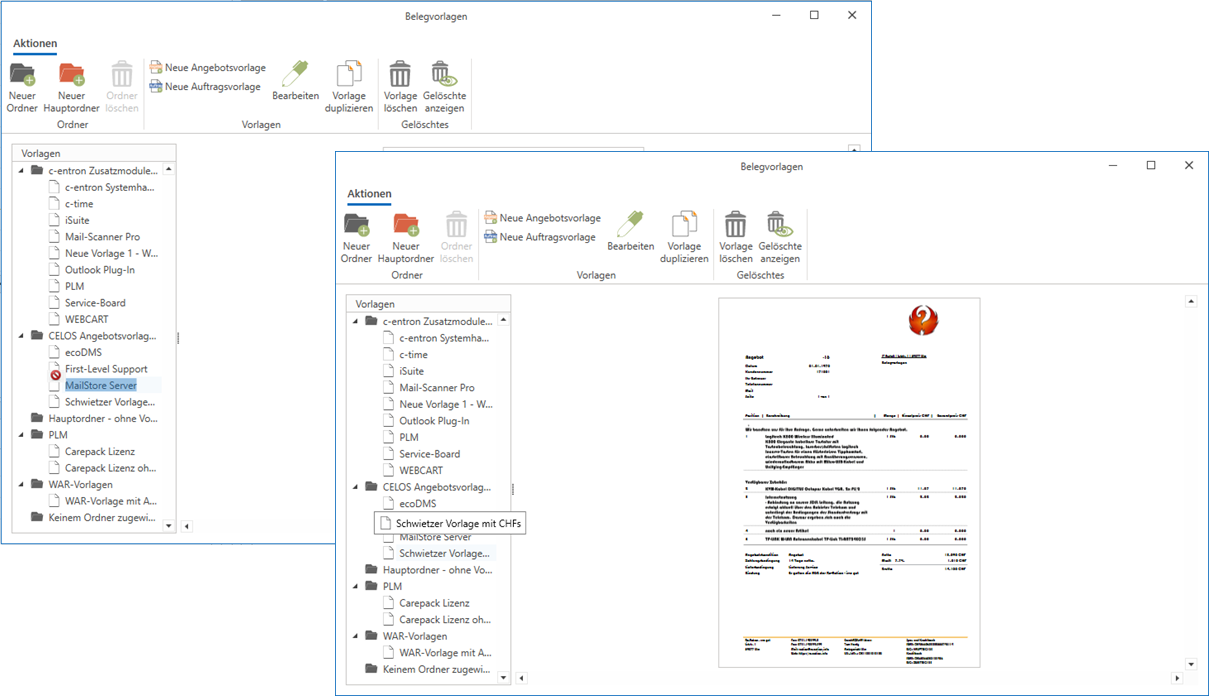
A document template that can be opened with a single click in the text Once an item has been selected (highlighted in dark blue), it cannot be moved. To move it, click on the Leaf icon Click on the template—not in the text.
Solution / Overview
Please check the following points:
- Check to see if the template is currently selected (highlighted in dark blue—click in the text).
- Click on the Leaf icon the template – not into the text.
- Then move the template to the desired folder.
Background

This behavior is system-related: If you click within the text of a document template, the view switches to edit mode (the template appears with a dark blue background). In this state, the drag-and-drop function is disabled. Only after clicking the Leaf icon enters selection mode and allows you to move items.
Common Mistakes
Common causes or misunderstandings:
- The user clicked on the text in the template instead of the sheet icon—as a result, the template is highlighted in dark blue and cannot be moved.
- The error is interpreted as a technical malfunction, even though it is caused solely by the click location.
Tip

Before moving the template, always make sure that not is highlighted in dark blue. Simply click on the sheet icon (not in the text) to switch to the correct mode.