%20(1).png)
FAQs about accounting export
Problem:
Document does not appear for export
Suggested solutions:
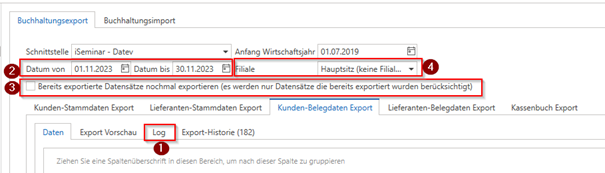
Check in the accounting export whether the "missing" document can be found in the "Logs" tab. The reason why it cannot currently be exported will also appear here—e.g., because revenue accounts are missing (in this case, please check the respective document for all items in the "Revenue accounts" column to see whether there is an entry here -> Note: The accounts for the item under "Financial Accounting" are only a template – the account stored in the item always applies for the export. For contract settlements, the account must therefore also be "pre-assigned" in the contract (enter manually or remove the item and re-insert it). (Screenshot point 1)
Check whether the "document date" (for supplier documents, the "external document date" applies) falls within the "date from/to" range you have set. (Screenshot point 2)
Check whether the missing document appears when you export the accounting data once "with" and once "without" the checkbox "Re-export already exported records" selected. (Screenshot point 3)
If you have licensed and are using branch management, please check whether you have selected the branch to which the document is assigned. (Screenshot point 4)
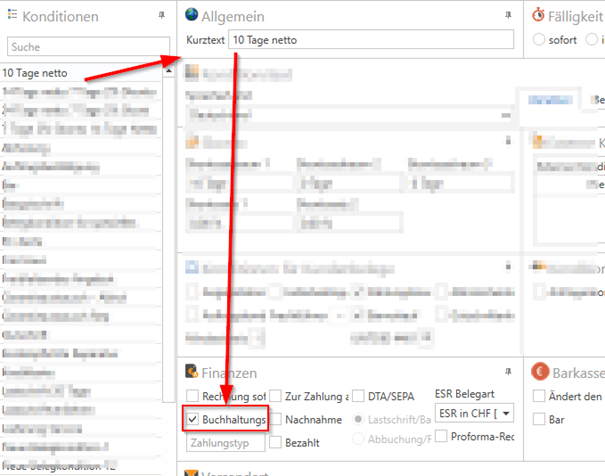
Check which "payment terms" have been selected in this document. Then check in "Document Management" for these terms whether the checkbox for "Accounting Export" in the "Finance" section is also active. Only documents with conditions that have this property active are included in the accounting export. If you activate this property now, the document will appear in the accounting export module immediately after the next "Update."
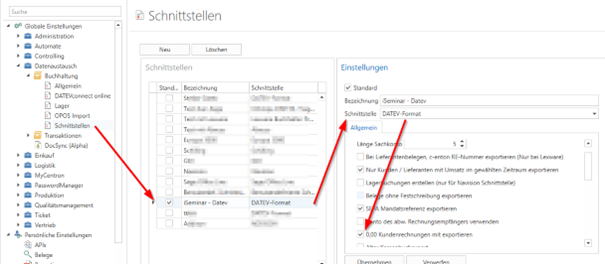
Check in the global settings under "Data exchange -> Accounting -> Interfaces" which interface you are using here (e.g., "DATEV format," "Lexware," ... - and please also specify this when making support requests) and whether it has a setting that "prevents" the export, such as "0.00 Export customer invoices" is not active.
Problem:
Account (customer or supplier) does not appear for export
Suggested solutions:
Check in the accounting export whether the account appears when you export the accounting once "with" and once "without" the checkbox "Re-export already exported records" active.
Check in the accounting export whether the "missing" account can be found in the "Logs" tab. The reason why it cannot currently be exported will also appear here—e.g., because "accounting number is missing." Then check the "Finances" section of the respective account to see if the accounting number is available (with licensed branch management, there may be a different accounting number for each branch; if this has been activated in the global settings, you will find this in the account in the address master under "Finances" in the "Branch accounting numbers..." tab).
Note: For suppliers, the "No accounting export" property can be activated in the address master in the "Conditions" section.
Check in the global settings under "Data exchange -> Accounting -> Interfaces" which interface you are using here (e.g., "DATEV format," "Lexware," ... - and please also specify this when making support requests) and whether it has a setting that "prevents" export, such as "Only export customers/suppliers with sales in the selected period."
If this property is active, documents from this period are checked – only if documents with a document date that falls within the "Date from/to" period of the export are available will the account be included in the export.
If it is not active, the "creation date" of the customer/supplier is checked and this must fall within the set "date from/to" period.