%20(1).png)
Frequently occurring errors and FAQs about importing items
Problem:
All article imports run with 0 articles, even though the source data is available and has content – article import fails.
Solution:
Check whether the table for external items is "full" by on Execute the following query in your database (c-entron SQL Manager):
SELECT MAX(i3d0) FROM ManufacturerArticle
If an i3D number greater than 2,000,000,000 (billion) appears in the "I3D0" column, then the i3D table for third-party items is full (integer data type -> 2.x billion).
To reset the "Manufacturer items" table, simply click on the [Delete all third-party items] button in the item import. This will remove all third-party items from your database so that none remain.
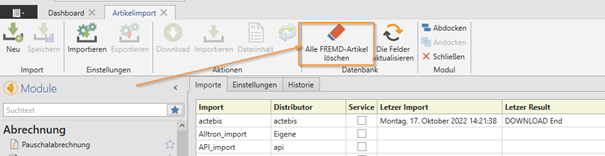
You should then be able to import items successfully again.
IMPORTANT: Please note that after executing the command, third-party items will no longer be available until the item import is executed again (either manually or via the service). It is therefore recommended to execute this command shortly before closing time so that the items are stored again overnight by the service.
Problem:
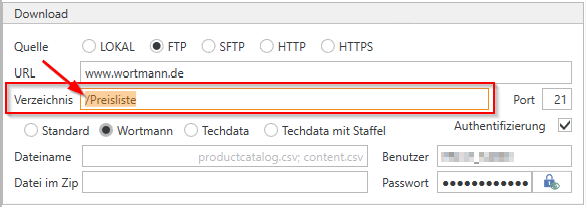
error: FTP Download The remote server returned an error: (550) File not available (e.g., not found or no access)
Solution:
The subdirectory "/price list" (at Wortmann) was not specified for the FTP server, so the specified file could not be found and therefore could not be downloaded.
Problem:
The "Service" section is disabled.
Solution:
If the "local" download option is selected in the settings when importing articles, the "Service" section is deactivated, as this can only be performed manually.
Problem:
How can old prices from article imports be deleted from the database?
Solution:
Empty the Manufacturer Items table by clicking the [Delete all third-party items] button in the item import. This will remove all third-party items from your database so that none remain.
IMPORTANT: Please note that after executing the command, third-party items will no longer be available until the item import is executed again (either manually or via the service). It is therefore recommended to execute this command shortly before closing time so that the items are stored again overnight by the service.