%20(1).png)
FAQ – Global Settings – Services – Index Search
(As of: April 2026)
Question
How do I configure index search in the global settings, and what do the options for automatic document indexing do?
Re:
⚙️ Administration
Short answer
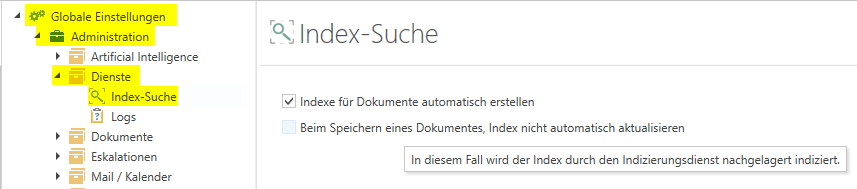
The index search is located under Global Settings → Administration → ServicesThere are two options for controlling whether documents are indexed immediately upon saving or at a later time by a background service.
Solution / Overview
Please follow these steps:
- Go to Global Settings → Administration → Services
- Select "Automatically create indexes for documents" so that all documents are indexed via a service
- Optional: Select "Do not automatically update the index when saving a document" if you want the indexing service to perform indexing at a later time
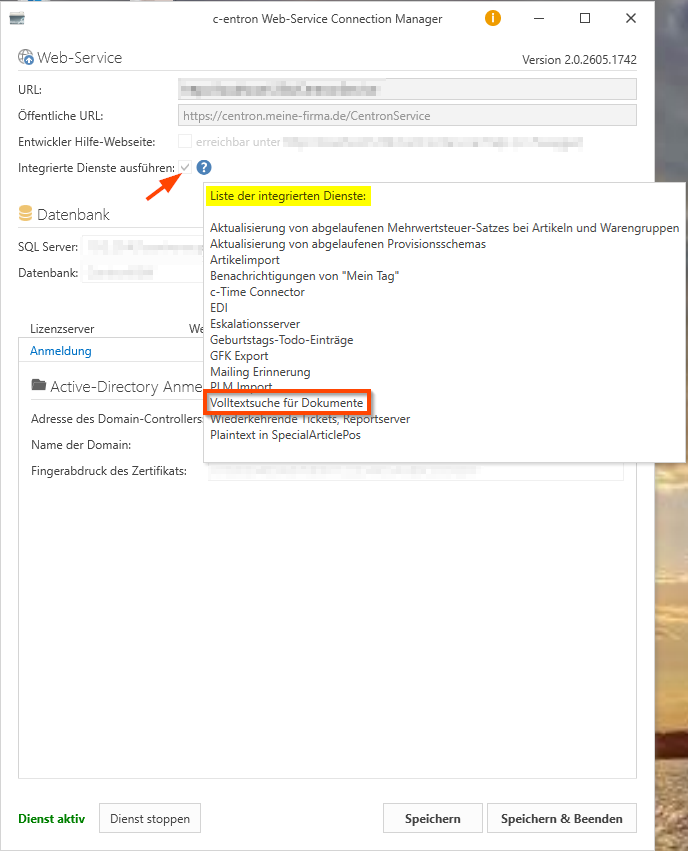
- Make sure that the "Run integrated services" option is enabled in the c-entron WebService Connection Manager
Background

What are indexes? Indexes are structured data that speed up access to information and enable efficient searching and querying.
If the option "Do not automatically update the index when saving a document" is enabled, a separate indexing service handles the update at a later time—that is, not immediately when the document is saved.
Common Mistakes
Common causes or misunderstandings:
- The "Automatically create indexes for documents" option is enabled, but the "Run integrated services" checkbox is missing in the WebService Connection Manager—as a result, indexes are not updated
- Indexes are expected to be up to date immediately after saving, even though delayed indexing is enabled
- The indexing service did not restart after the setting was enabled
Tip

To ensure that indexes remain accurate and up to date, the c-entron Web Service Connection Manager The checkbox next to "Execute integrated services" must be selected. If this setting is missing, new or modified documents will not be indexed downstream.
Related Topics
https://hilfe.c-entron.de/de/systemhaus-erp/Working-version/administratives-erp