%20(1).png)
MSP - Billing
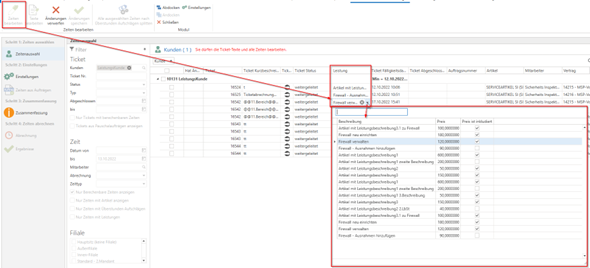
In simplified ticket billing, the "Service" column has been implemented for times. This allows you to search and filter by the "services" for each time. It is also possible to remove the service for the respective time by clicking on "Edit times" or to select another service for this customer from the drop-down menu.
The description settings for "Price" and "Price is included" are also displayed here for the service.
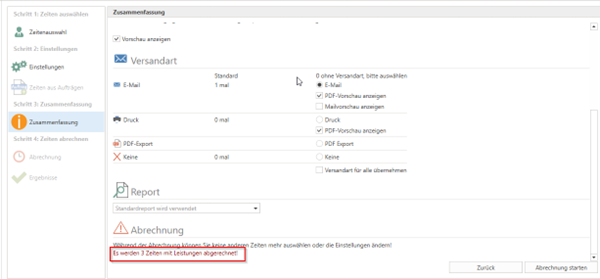
The "Summary" also shows how many "times with services" are currently being billed.
Now the times can be calculated.
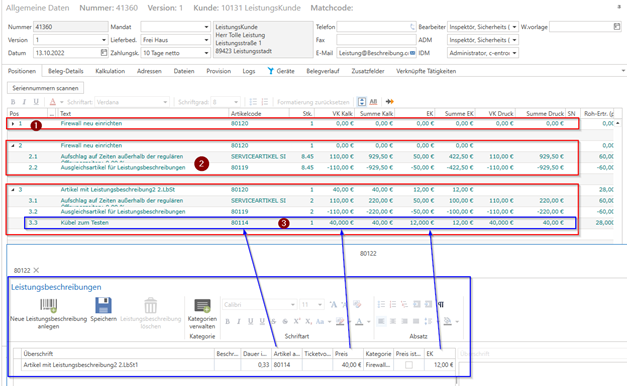
With such performance, this now presents itself as follows for the time positions:
A closed bill of materials is created. The bill of materials header is the bill of materials header item stored in the global settings (under "Ticket -> Billing -> Services"). The "Service description" is inserted as the item text.
The bill of materials then contains the service item for the time with the "normal pricing logic" and the "service compensation item," which was also stored in the global settings for this purpose.
If the "Price is included" checkbox is not selected for this service in the customer's master sheet, the "Item" stored in the service item and master sheet appears, which also contains the "Price" (retail price) and "Cost price" that you have stored for this service.