%20(1).png)
Task Management FAQs
Problem:
Task is not created
Solution:
Please check whether the task is available in the "Task Management" section of c-entron.NET, in the address master for the respective customer in the "Tasks" tab, or in the service board under "Planning -> Recurring Tickets."
Are all "mandatory fields" (in bold) under "(Ticket) Details" filled in for this task?
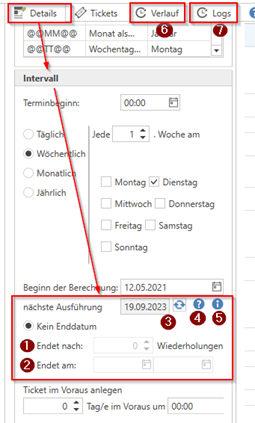
In the "Interval" section, also check whether the task has an entry under "Ends after x repetitions" (screenshot, point 1) or under "Ends on" (screenshot, point 2) and what is displayed as "Next execution" (screenshot, point 3). By clicking on the "?" (screenshot, point 4) and the "i" (screenshot, point 5) next to the "Next execution" field, you can display the last and next execution dates.
Please check the "History" tab (screenshot, point 6) to see what is displayed as the latest "last execution." Has the "missing task" already been created manually by a user?
Please also check in the "Logs" tab (screenshot, point 7) whether the task is displayed as "successfully executed" or whether an information or error message is displayed.
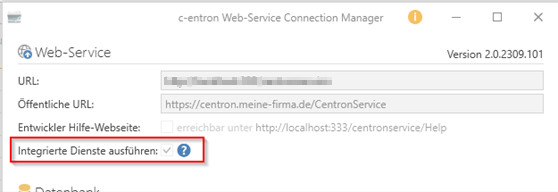
Please also check in the "c-entron Connection Manager" of your web service whether the checkbox for "Activate integrated services" is checked