%20(1).png)
Unused third-party items – Converting manufacturer items
Unused external items – Converting manufacturer items that are not yet included in a document
(Available from release 2.0.2302.x)
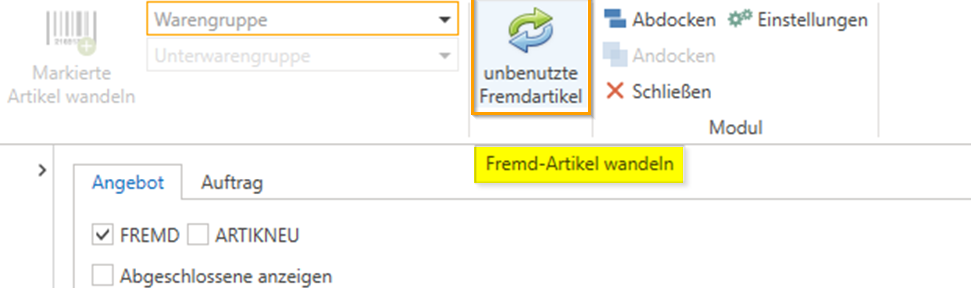
In article management, the "Convert article" button can be used to access the "Convert article" area. Here, the button has been "unused third-party items" this allows third-party items to be converted without them being included in an attachment/document such as a quotation/order.
The prerequisite for this is that product groups are included in the article import.
To do this, first click on [Convert item] in the Item Management module 
and then click [Unused third-party items] in the following window.
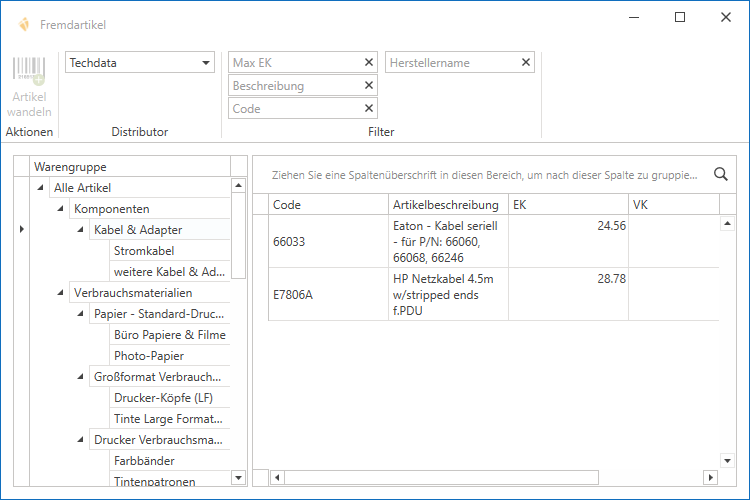
This opens the "Third-party items" dialog box/window, where you can view and filter all third-party items per distributor and convert them by selecting the item and clicking the [Convert item] button.
The item management screen then opens, where you can enter and save the relevant data for this item.