Web Service Connection Manager – Additional Web Service Services
Easily configure, manage, and update additional web services.
This gives you the advantage that if you need multiple web services (e.g., databases for branches, tests, etc.), you no longer need to set up a new server for each database or manually copy the installed web service and register it as a service via the console.
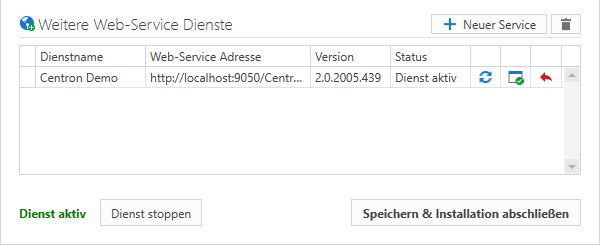
Starting with version 2.02005.460, the c-entron Web Service Connection Manager has been expanded to include a new section called "Additional Web Services."
Web services for additional databases can be created in this section.
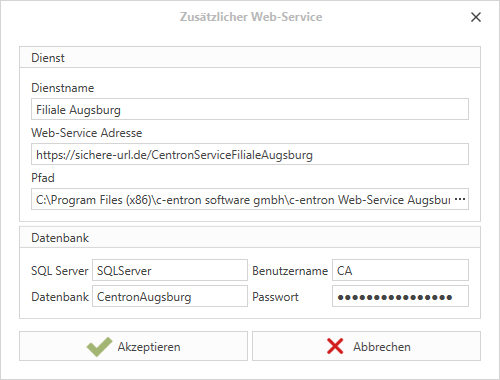
Clicking on New Service opens a window in which the new service can be configured.
Service name:
Name of the service.
Web service address:
The URL for the web service.
Path:
The path where the new web service will be stored. IMPORTANT: No sub-VZ will be created. Therefore, make sure that the stored directory is empty.
Database:
The configuration of the database connection.
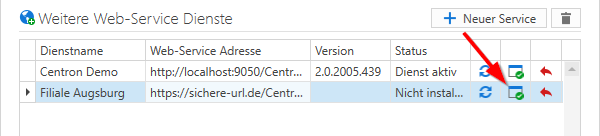
When you click Accept, the new web service appears in the list.
With a Double-click on a service configuration, it can be edited.
By clicking on (Install/update service) the service will be installed or updated if already present.
By clicking on(Update status) the status of the service is updated.
About (Reset) the service is deleted and the configured directory is emptied. The configuration is not deleted.
About (Delete selected web service) the service and its associated configuration will be deleted.
Special notes:
Update web service The web service installer can only install the Main web service update. After installation, the configured Web services must be updated manually.
Option 1: Start the configurator and click on (Install/update service) click.
Option 2: Start the configurator and click on Save & Complete Installationclick. All services will be automatically updated upon completion.
Option 3: Configure the configurator with the parameter silent start.
Uninstall web service
If you want to uninstall the web service, you must first delete the other services manually. To do this, start the configurator and delete the services. You can then uninstall the web service.
Technical information:
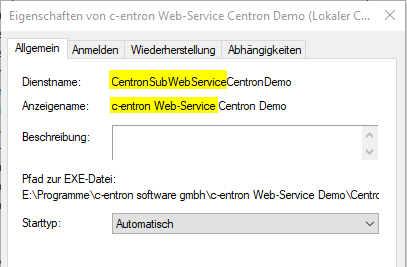
Details about the new service:
Service name:
The service name always consists of two parts. Part 1 is a fixed text CentronSubWebService. Part 2 is the service name without spaces.
Display name:
The display name also consists of two parts. Part 1 is a fixed text c-entron web servicepart 2 is the service name.
Start type:
The web service is available at Automatically set.
When installing the Web Services, the configurator is not added to the Web Service directory.
To change the settings under Web Services, always use the configurator for the main Web Service.
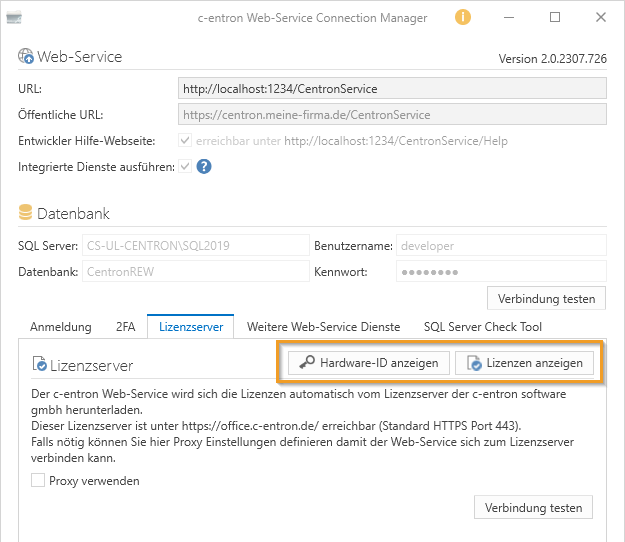
Starting with version 2.0.2007.396, the "Web Service Connection Manager" has been expanded in the License Server area to include the [Show Hardware ID] and [Show Licenses] buttons.
[Show hardware ID]
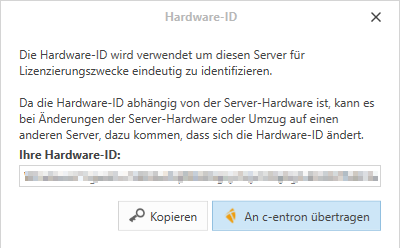
The [Show Hardware ID] button automatically reads the server's hardware ID (which you would otherwise have to do using the tool at Dongle-free you need for hardware ID registration.
This unique hardware identification number, which is generated from the components of the server's hardware and is unique. -> This hardware ID will replace the dongle in the future.
However, you must register to do so.
Then click on [Transferred to c-entron], our attractive web form will open at Dongle-free and you have the option to enter your data for hardware ID registration here
[View licenses]
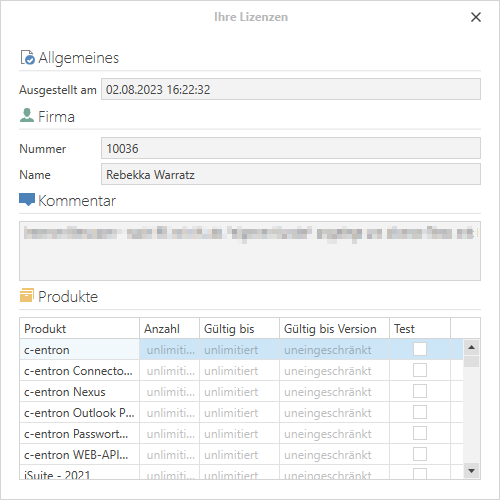
By clicking the button [Show licensesa new license is requested from the license server, and then the data is displayed, which may take a little time.
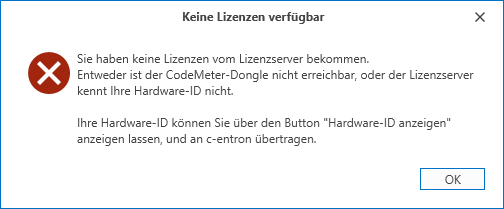
If you can connect to the license server but still cannot obtain a license, a message will appear stating that no licenses are available.
Either the CodeMeter dongle is not accessible or your hardware ID was not recognized by the license server. Now you can use the buttons [Display hardware ID] [Transfer to c-entron] the option to read them out and register them immediately with c-entron.
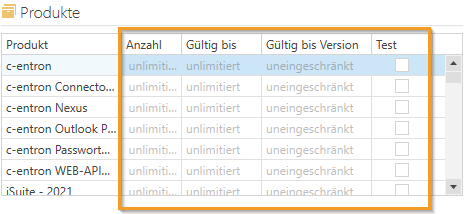
Overview of licenses
Listed here is the "Product", which "Number", which "Valid until"–Date, the valid until version" and whether it is a "Test"-Version.
If you are using a trial version or a limited version, or if your support has been canceled, this can be seen from the version numbers, meaning that newer versions cannot be used here
Example:
If you have entered "2.0.2006.9999" as the "Valid until version" and want to use a 2.0.2007 version, you will receive the following message when you log in:
"You do not have a license for c-entron version 2.0.2007.123. You may use version 2.0.2006.9999 at most."
FAQ / Troubleshooting
Question:
I receive the following message in c-entron.NET: "Could not get the ticket" (and/or in c-entron Delphi: "Database from web service differs from application database.")
Answer:
You need a separate web service for each database.
Question:
What is the "Run integrated services" setting for?
Answer:
It is essential that at least one c-entron web service in the database has the "Execute integrated services" setting enabled in the c-entron WebService Connection Manager.
If these integrated services are not running, important functions and checks cannot be performed correctly.
For example, in one of our latest releases, we implemented a cache for tickets to reduce the loading time of ticket lists. Computationally intensive columns are moved to a cache table and retrieved from there. However, without the integrated services running, this cache is not updated, which can result in missing or incomplete information in the ticket list.
In addition, there are other integrated services that perform important data maintenance and servicing processes in the background. We therefore recommend checking the settings mentioned and ensuring that they are configured correctly to guarantee full functionality.
JavaScript errors detected
Please note, these errors can depend on your browser setup.
If this problem persists, please contact our support.
%20(1).png)