%20(1).png)
Reset script for River rights
(As of: April 2026)
Available starting with this release: 2.0.2509.x
Re:
⚙️ Administration

This document provides information Administrators explains the impact of the current update on Riversuite user permissions and describes how to reset permissions if necessary. It is Not intended for end users, but exclusively for internal administrators and support teams.
Background
As part of the database separation between Riverbird and c-entron, the release 2.0.2509.xx deactivated permissions that are no longer needed in the c-entron database.
These permissions can still be viewed as "deactivated permissions" in the permissions management section
Rights affected:
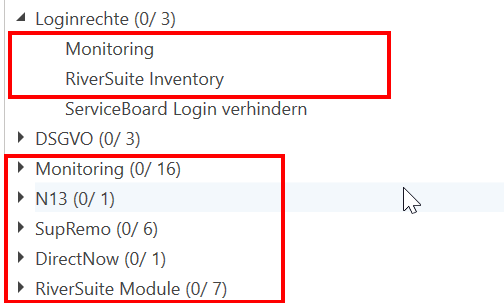
Separate databases: If the Riversuite and c‑entron databases are already separate, no action is required.
Non-separated databases: In this case, the following appear All Riversuite rights are marked as "deactivated", then "re-enable" the management permissions using the following SQL script:
UPDATE Sichrech
SET Obsolete = 0
WHERE I3D IN (
    20800015, 20800016, 20800026, 20800027, 20800047, 20800048, 20800049,
    20800090, 20800091, 20800103, 20800105, 20800114, 20800115, 20800116,
    20800117, 20800118, 20800131, 20800132, 20800133, 20800057, 20800058,
    20800059, 20800060, 20800062, 20800087, 20800063, 20800064, 20800055,
    20800056, 20800065, 20800066, 20800067, 20800068, 20800069, 20800070,
    20800071, 20800072, 20800080, 20800081, 20800110, 20800083
);
Recommendation
Before execution: Create a backup of the database.
After completion: Check whether all required permissions are active again.
In the long term: If possible, a Clear separation between the Riversuite and c‑entron databases to prevent future conflicts. Here are the instructions: Separate databases
Keywords (internal): Database cleanup, cleanup, database partitioning, partition database, RMM, Riverbird