%20(1).png)
Interface to the IONOS AI Model Hub
(Available starting with release v2.0.2503.x)
General Information
With the IONOS AI Model Hub, IONOS offers a Germany-based environment featuring open-source AI models such as the Llama and Mistral series.
Because it is hosted in Germany and requests are deleted directly on IONOS’s servers, this is an AI solution that is 100% GDPR-compliant, and with our interface, you can unlock the full potential of this product!
Requirements:
At least version 2.0.2503.x
The AI Integration License (free until September 30, 2025, upon request)
Your own account on cloud.ionos.com and the corresponding API key (see below for detailed instructions)
Important note: IONOS is currently running a promotion through September 30, 2025, under which there are no charges for content generation. Starting October 1, 2025, standard generation fees will apply. Read more here:
https://cloud.ionos.com/managed/ai-model-hub
Instructions for setting up the AI Model Hub on IONOS
The AI Model Hub is a product of IONOS. To obtain the API key for the interface in c-entron, you will need your own account here.
IONOS provides a detailed description of this process.
https://docs.ionos.com/cloud/ai/ai-model-hub/tutorials/access-management
Once you have generated your API key, you can enter it in c-entron.NET in the next step.
Important note: Keep your API key in a safe place; IONOS cannot retrieve it for you.
Instructions for configuring the interface in c-entron.NET
Using your IONOS API key, you can now navigate to the global settings in c-entron.NET.
In the area of Administration -> Artificial Intelligence -> AI Integration You will see the following form:
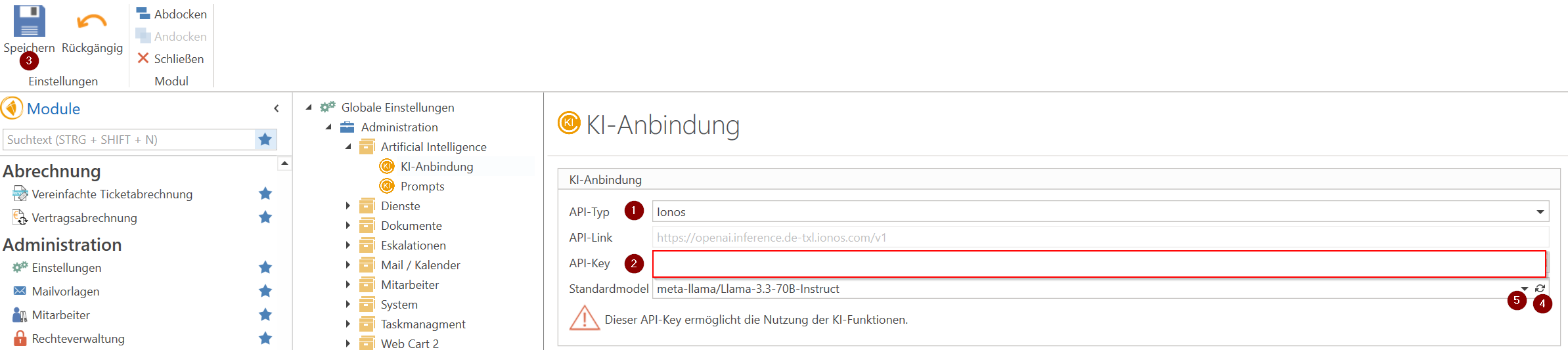
API type: Select IONOS as the interface here
API key: Enter your IONOS API key here
Save: After entering the API key, save the settings so that they are stored in the database.
/ 5. Standard model: Click the small reload icon in the standard model bar to get a live update of the available models. (The live update also ensures that new models provided by IONOS are immediately available.)
Select the AI model here that you want to use for AI integration in c-entron.NET and ServiceBoard.
Important note: We recommend the model shown "meta-llama/Llama-3.3-70B-Instruct". Of course, other models can be selected, but our integration is based on the model mentioned above!
Since the AI field is growing rapidly and we plan to continue expanding AI capabilities in ServiceBoard and ERP, our recommendations regarding the appropriate models may change in the future.
As mentioned, the models are provided by IONOS; please contact IONOS directly for any changes:
https://docs.ionos.com/cloud/release-notes/previous-releases
After clicking "Save" again, the selected model is ready and can be used in c-entron.NET and ServiceBoard.
Related Topics
FAQ – 401 Unauthorized bei KI-Auswertung (z. B. IONOS)