%20(1).png)
Swiss QR requirements from November 2025
(Available from pre-release v2.0.2509.x)
Adapting inventory reports (hybrid customer systems) to the new Swiss QR requirements from November 2025
This help section serves as a supplement to the practical video provided, where all changes can be followed step by step.
New requirements for QR invoices will come into effect in Switzerland on November 21, 2025. These require that all address details in the QR code must be provided in a structured format. The previously permitted address type "K" will be completely eliminated. This means that the street, house number, postal code, and city must always be entered as separate fields and displayed in the QR code.
The aim of this white paper is to provide you with practical guidance on how to adapt your existing Hybrid customer system reports from version 24.x onwards to the new requirements. This means that it is not necessary to switch to a completely new report. The advantage for you is that your individual CI design settings are retained and do not need to be reconfigured and transferred to a new report.
If your existing report contains no or only a few CI adjustments, you can alternatively download the current report version from the report portal and use it. This gives you two options – either to adjust the existing report or to use the latest standard version.
Further information on reports with version 23.x and earlier
Please note: Reports with a version older than 24.x (e.g., 23.x or earlier) cannot be taken into account in this white paper. These versions do not yet include the necessary changes and functions, meaning that it is not possible to adapt them to the new specifications.
To ensure that the QR code is displayed in accordance with legal requirements, it is therefore essential that you switch to a newer version of the hybrid report.
OVERVIEW OF THE AREAS AFFECTED
In order to implement the legal requirements for structured address representation in QR invoices, adjustments are necessary in several areas. These relate to both the technical aspects (queries and code) and the report itself. Specifically, the following areas are affected:
Additional query (SQL query)
Extension of the report with a new database query
The goal is to provide the required fields (street, house number, zip code, city) in a structured manner.
Adjustments in the code area
Addition of new variables for structured address processing
Adding code in various places to ensure the transfer and processing of the new fields
Changes on the "pgQR" report page
Replacement of previous variables with new structured address variables
Adaptation of the content of the QR code in accordance with the new legal requirements
DETAILED DESCRIPTION OF THE CHANGES
The following chapters explain the necessary adjustments in detail. They show step by step which changes need to be made to the queries, the code, and the report itself in order to correctly implement the structured address display in the QR invoice.
Before starting work, please make a backup copy of your current report. This will ensure that you can revert to the existing version at any time if necessary.
CHANGES IN THE QUERIES
In order for the structured address information to be transferred to the QR code, an additional SQL query must be added to the report. Proceed as follows:
Open the desired report via the report management (double-click).
Select the item in the menu bar. New.
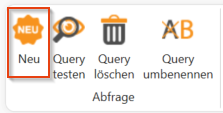
Insert a new query and name it qry_QR_Customer.
Then enter the following SQL code into the query and save the query:
DECLARE
	@Art varchar(30),
	@I3dArt VARCHAR(10),
	@sql1 nvarchar(4000),
	@sql2 nvarchar(4000),
	@BuildNumber int,
	@I3D NVARCHAR(300);


SET @I3dArt = 'Beleg';

IF @I3dArt = 'Beleg'
BEGIN
    SET @Art = '@Anlagenart';
    SET @I3D = '@1';
END

SET @BuildNumber = (select top 1 cast(PARSENAME(CurrentVersion, 2) as int) as BuildNumber
            			from ApplicationVersions
            			where ApplicationKind = 2097152
            			order by lastLogin desc)

IF @Art = 'Rechnung' BEGIN
    SET @sql1 =  '
    SELECT
	[centronBuildNumber] = (select top 1 cast(PARSENAME(CurrentVersion, 2) as int) as BuildNumber
                                from ApplicationVersions
               					where ApplicationKind = 2097152
               					order by lastLogin desc)

	, [centronVersion] = (select top 1 CurrentVersion
               					from ApplicationVersions
               					where ApplicationKind = 2097152
               					order by lastLogin desc)
    ';

IF @BuildNumber >= 2509 BEGIN
    SET @sql2 =  '
        -- Belegempfänger
      , [BelegempfaengerStrasse]       = ISNULL(rc.Street, '''')
      , [BelegempfaengerHausnummer]    = ISNULL(rc.HouseNumber, '''')
      , [BelegempfaengerPostfachAktiv] = ISNULL(rc.IsPOBoxActive, 0)
      , [BelegempfaengerPostfach]      = ISNULL(rc.POBox, '''')

        -- Rechnungsempfänger
      , [RechnungsempfaengerStrasse]       = ISNULL(rcI.Street, '''')
      , [RechnungsempfaengerHausnummer]    = ISNULL(rcI.HouseNumber, '''')
      , [RechnungsempfaengerPostfachAktiv] = ISNULL(rcI.IsPOBoxActive, 0)
      , [RechnungsempfaengerPostfach]      = ISNULL(rcI.POBox, '''')

        -- Lieferempfänger
      , [LieferempfaengerStrasse]       = ISNULL(rcD.Street, '''')
      , [LieferempfaengerHausnummer]    = ISNULL(rcD.HouseNumber, '''')
      , [LieferempfaengerPostfachAktiv] = ISNULL(rcD.IsPOBoxActive, 0)
      , [LieferempfaengerPostfach]      = ISNULL(rcD.POBox, '''')

        -- Lizenzempfänger
      , [LizenzempfaengerStrasse]       = ISNULL(rcL.Street, '''')
      , [LizenzempfaengerHausnummer]    = ISNULL(rcL.HouseNumber, '''')
      , [LizenzempfaengerPostfachAktiv] = ISNULL(rcL.IsPOBoxActive, 0)
      , [LizenzempfaengerPostfach]      = ISNULL(rcL.POBox, '''')

    FROM Invoices i
    LEFT JOIN ReceiptReceivers rc  ON rc.i3d  = i.ReceiptReceiverI3D
    LEFT JOIN ReceiptReceivers rcI ON rcI.i3d = i.ReceiptReceiverInvoiceI3D
    LEFT JOIN ReceiptReceivers rcD ON rcD.i3d = i.ReceiptReceiverDeliveryI3D
    LEFT JOIN ReceiptReceivers rcL ON rcL.i3d = i.ReceiptReceiverLicenseI3D
    WHERE i.i3d = '+@I3D+';
    ';
    END
ELSE BEGIN
    SET @sql2 =  '
        -- Belegempfänger
      , [BelegempfaengerStrasse]       = ''''
      , [BelegempfaengerHausnummer]    = ''''
      , [BelegempfaengerPostfachAktiv] = 0
      , [BelegempfaengerPostfach]      = ''''

        -- Rechnungsempfänger
      , [RechnungsempfaengerStrasse]       = ''''
      , [RechnungsempfaengerHausnummer]    = ''''
      , [RechnungsempfaengerPostfachAktiv] = 0
      , [RechnungsempfaengerPostfach]      = ''''

        -- Lieferempfänger
      , [LieferempfaengerStrasse]       = ''''
      , [LieferempfaengerHausnummer]    = ''''
      , [LieferempfaengerPostfachAktiv] = 0
      , [LieferempfaengerPostfach]      = ''''

        -- Lizenzempfänger
      , [LizenzempfaengerStrasse]       = ''''
      , [LizenzempfaengerHausnummer]    = ''''
      , [LizenzempfaengerPostfachAktiv] = 0
      , [LizenzempfaengerPostfach]      = ''''
    ';
END
END -- Rechnung

EXEC(@sql1 + @sql2)
This query ensures that the relevant address information (street, house number, P.O. box) is available in a structured format for all recipient types (document, invoice, delivery, and license recipients).
Changes in the report
After the new query qry_QR_Kunde has been created, it must be integrated into the report itself. To do this, proceed as follows:
Open the report in the Report Designer:
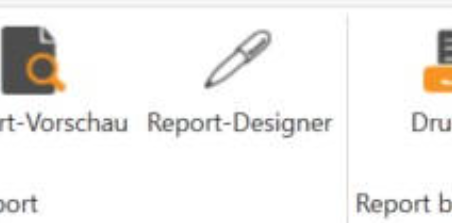
In the open report, switch to the tab report.
In the area, select Select Report Data the newly created query qry_QR_Customer from.
Confirm your selection with OK.
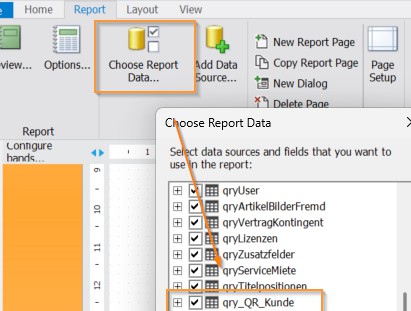
This makes the query available as a data source in the report and allows it to be used for variables and the QR code.
Changes in the code
To ensure that the structured address fields in the QR code are processed correctly, additional variables must be added to the code. Since the positions may vary depending on the report version, please proceed as follows:
The report is still open in the report designer.
Switch to the Home tab and click on the Find magnifying glass.
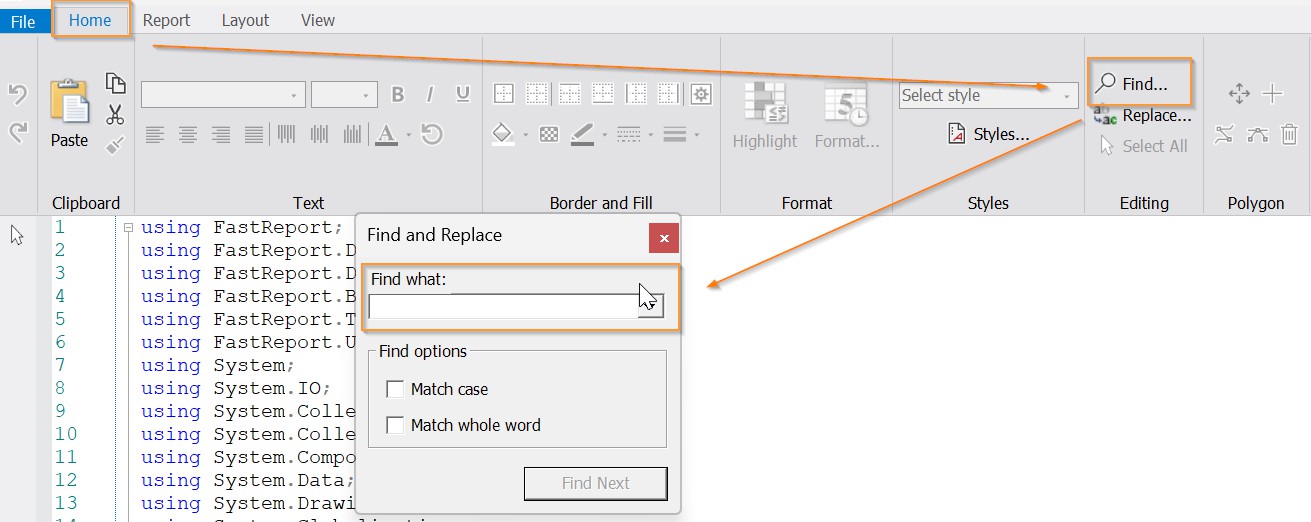
Now enter the following search parameter in the search field to find the customer variables for the Swiss QR code:

Customer postal code + city for QR code in QR invoice (Switzerland)
This will take you to the relevant code location, where you will find the following code:
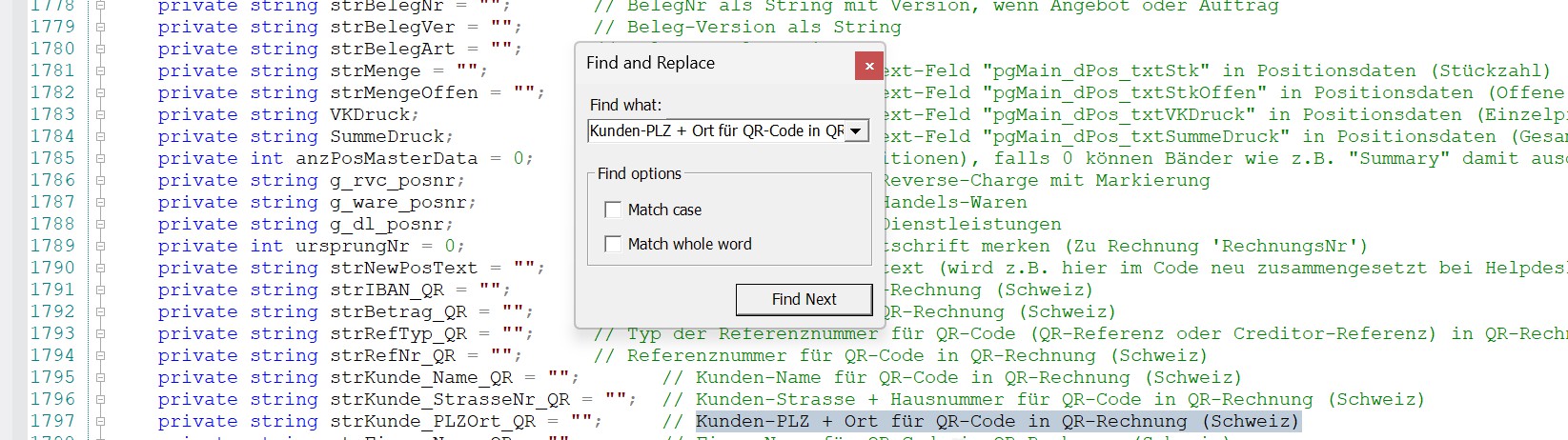
Paste this code directly below this line:
 // Ergänzung ESR-Strukturierte Daten
private string strKunde_Strasse_QR = ""; // Kunden-Strasse ohne Hausnummer für QR Code der strukturierten QR-Rechnung (Schweiz)
private string strKunde_Hausnummer_QR = ""; // Kunden-Hausnummer ohne Straße für QR Code der strukturierten QR-Rechnung (Schweiz)
private string strKunde_PLZ_QR = ""; // Kunden-Postleitzahl für QR Code der strukturierten QR-Rechnung (Schweiz)
private string strKunde_Ort_QR = ""; // Kunden-Ort für QR Code der strukturierten QR-Rechnung (Schweiz)
Continue with the search for company variables. To do this, proceed as follows:
Now enter the following search parameter in the search field to find the company variables for the Swiss QR code (you will find the area directly 3 lines below the inserted code):
Company postal code + city for QR code in QR invoice (Switzerland)
This will take you to the relevant code location, where you will find the following code:
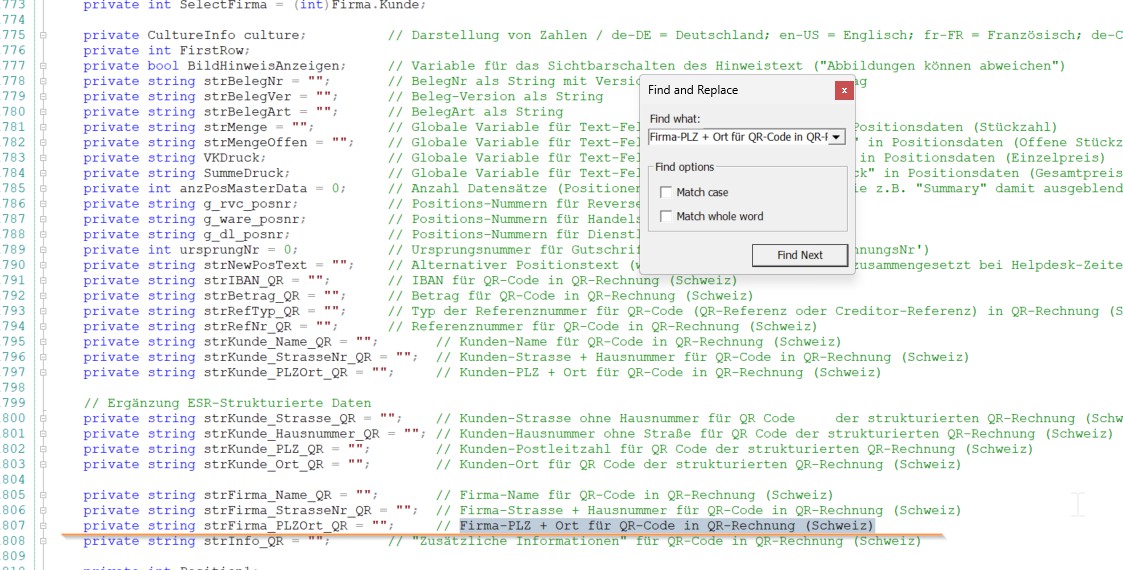
Paste this code directly below this line:
// Ergänzung ESR-Strukturierte Daten
 private string strFirma_Strasse_QR = ""; // Firmen-Strasse ohne Hausnummer für QR Code der strukturierten QR-Rechnung (Schweiz)
 private string strFirma_Hausnummer_QR = ""; // Firmen-Hausnummer ohne Straße für QR Code der strukturierten QR-Rechnung (Schweiz)
 private string strFirma_PLZ_QR = ""; // Firmen-PLZ für QR Code der strukturierten QR-Rechnung (Schweiz)
 private string strFirma_Ort_QR = ""; // Firmen-Ort für QR Code der strukturierten QR-Rechnung (Schweiz)
Next, the company variables are added. Use the search function again to find the relevant location in the code.
To do this, search for the following expression:
strCompany_ZipCode_City = ((String)Report.GetColumnValue("qryCompany.ZipCode")) + " " + ((String)Report.GetColumnValue("qryCompany.City"));
      // Ergänzung ESR-Strukturierte Daten
      int centronBuildNumberStrAdr = 2509;
      string strMeldungSoftwareVersion = string.Format(culture, "Falsche Software-Version ({0:s}).{1}Strukturierte Adressen erst ab Build {2:d}.{1}Software-Update erforderlich.", (String)Report.GetColumnValue("qry_QR_Kunde.centronVersion"), Environment.NewLine, centronBuildNumberStrAdr);
      string strMeldungFehlerAdresse = "Fehlerhafte strukturierte Adresse gefunden";
      string adr = (Report.GetColumnValue("qryFirma.Strasse") as string) ?? "";
      string strAdressformat_QR = "S";

      strFirma_Strasse_QR = adr;
      strFirma_Hausnummer_QR = "";

      // Postfach-Erkennung
      if (Regex.IsMatch(adr, @"^\s*(Postfach|Case postale|Casella postale|P\.?O\.?\s*Box)", RegexOptions.IgnoreCase))
      {
        strFirma_Strasse_QR = adr.Trim();
        strFirma_Hausnummer_QR = "";
      }
      else
      {
        // Hausnummern-Muster für CH inkl. bis/ter/quater/Brüche
        string hausnummerPattern = @"\d+\s*(?:[A-Za-z]+|bis|ter|quater|½)?(?:\s*[/-–]\s*\d+(?:[A-Za-z]+)?)?(?:\s+(?:Eingang|Eing\.|Hinterhaus|HH)\s*[A-Z])?";

        // Straße vor Hausnummer
        var m = Regex.Match(adr, @"^\s*(?<street>.*?)\s+(?<hno>" + hausnummerPattern + @")\s*$", RegexOptions.IgnoreCase);

        if (!m.Success)
        {
          // Hausnummer vor Straße
          m = Regex.Match(adr, @"^\s*(?<hno>" + hausnummerPattern + @")\s+(?<street>.+?)\s*$", RegexOptions.IgnoreCase);
        }

        if (m.Success)
        {
          strFirma_Strasse_QR = Regex.Replace(m.Groups["street"].Value, @"\s{2,}", " ").Trim();
          strFirma_Hausnummer_QR = m.Groups["hno"].Value.Trim();
        }

        //Zeilenumbrüche ersetzen mit Leerzeichen und begrenzen auf die max. erlaubten Zeichen
        strFirma_Hausnummer_QR = strFirma_Hausnummer_QR.Replace(Environment.NewLine, " ");
        if (strFirma_Hausnummer_QR.Length > 16) {
          strFirma_Hausnummer_QR = strFirma_Hausnummer_QR.Substring(0,16);
        }

        if (strFirma_Hausnummer_QR == "") {
          pgQR_bcQR.Visible = false;
          pgQR_txtZE.TextColor = pgQR_dEmpfangsschein_txtZE.TextColor = Color.Red;
          if ((Int32)Report.GetColumnValue("qry_QR_Kunde.centronBuildNumber") < centronBuildNumberStrAdr) {
            pgQR_txtZE.Text = strMeldungSoftwareVersion;
          } else {
            pgQR_txtZE.Text = string.Format(culture, "{0}{1}(Hausnummer fehlt).", strMeldungFehlerAdresse, Environment.NewLine);
          }
        }
      }

      // Zuordnung der Daten
      strFirma_PLZ_QR = ((String)Report.GetColumnValue("qryFirma.PLZ"));
      strFirma_Ort_QR = ((String)Report.GetColumnValue("qryFirma.Ort"));

      //Zeilenumbrüche ersetzen mit Leerzeichen und begrenzen auf die max. erlaubten Zeichen
      strFirma_Strasse_QR = strFirma_Strasse_QR.Replace(Environment.NewLine, " ");
      if (strFirma_Strasse_QR.Length > 70) {
        strFirma_Strasse_QR = strFirma_Strasse_QR.Substring(0,70);
      }
      strFirma_PLZ_QR = strFirma_PLZ_QR.Replace(Environment.NewLine, " ");
      if (strFirma_PLZ_QR.Length > 16) {
        strFirma_PLZ_QR = strFirma_PLZ_QR.Substring(0,16);
      }
      strFirma_Ort_QR = strFirma_Ort_QR.Replace(Environment.NewLine, " ");
      if (strFirma_Ort_QR.Length > 35) {
        strFirma_Ort_QR = strFirma_Ort_QR.Substring(0,35);
      }

      if ( (strFirma_Strasse_QR == "") || (strFirma_PLZ_QR == "") || (strFirma_Ort_QR == "") ) {
        pgQR_bcQR.Visible = false;
        pgQR_txtZE.TextColor = pgQR_dEmpfangsschein_txtZE.TextColor = Color.Red;
        if ((Int32)Report.GetColumnValue("qry_QR_Kunde.centronBuildNumber") < centronBuildNumberStrAdr) {
          pgQR_txtZE.Text = strMeldungSoftwareVersion;
        } else {
          pgQR_txtZE.Text = string.Format(culture, "{0}{1}", strMeldungFehlerAdresse, Environment.NewLine);
        }
      }
The next step is to take an existing if-else branch expanded.
Please search for the following code:
strCustomer_PLZOrt_QR = ((String)Report.GetColumnValue("qryHeaderData.RechCustomerPLZ"))
Without any changes, the code section looks like this:

Place the following code addition in the If branch, i.e., directly in the next line after the search text found:
        // Ergänzung ESR-Strukturierte Daten
        if ((Int32)Report.GetColumnValue("qry_QR_Kunde.RechnungsempfaengerPostfachAktiv") == 1) {
          strKunde_Strasse_QR = ((String)Report.GetColumnValue("qry_QR_Kunde.RechnungsempfaengerPostfach"));
          strKunde_Hausnummer_QR = "";
        } else {
          strKunde_Strasse_QR = ((String)Report.GetColumnValue("qry_QR_Kunde.RechnungsempfaengerStrasse"));
          strKunde_Hausnummer_QR = ((String)Report.GetColumnValue("qry_QR_Kunde.RechnungsempfaengerHausnummer"));

          //Zeilenumbrüche ersetzen mit Leerzeichen und begrenzen auf die max. erlaubten Zeichen
          strKunde_Hausnummer_QR = strKunde_Hausnummer_QR.Replace(Environment.NewLine, " ");
          if (strKunde_Hausnummer_QR.Length > 16) {
            strKunde_Hausnummer_QR = strKunde_Hausnummer_QR.Substring(0,16);
          }
          if (strKunde_Hausnummer_QR == "") {
            pgQR_bcQR.Visible = false;
            pgQR_txtEZP.TextColor = pgQR_dEmpfangsschein_txtEZP.TextColor = Color.Red;
            if ((Int32)Report.GetColumnValue("qry_QR_Kunde.centronBuildNumber") < centronBuildNumberStrAdr) {
              pgQR_txtEZP.Text = strMeldungSoftwareVersion;
            } else {
              pgQR_txtEZP.Text = string.Format(culture, "{0}{1}(Hausnummer fehlt).", strMeldungFehlerAdresse, Environment.NewLine);
            }
          }
        }
        strKunde_PLZ_QR = ((String)Report.GetColumnValue("qryKopfdaten.RechKundPLZ"));
        strKunde_Ort_QR =  ((String)Report.GetColumnValue("qryKopfdaten.RechKundOrt"));
After adjusting the if branch, the else branch must now also be expanded.
1. You can either scroll directly to the relevant section in the code or use the search function again (Home → Find) to get there faster. You can find the
Area as follows:
strCustomer_ZipCode_QR = ((String)Report.GetColumnValue("qryHeaderData.Customer_ZipCode"))
You supplement this Else case with the following code:
        // Ergänzung ESR-Strukturierte Daten
        if ((Int32)Report.GetColumnValue("qry_QR_Kunde.BelegempfaengerPostfachAktiv") == 1) {
          strKunde_Strasse_QR = ((String)Report.GetColumnValue("qry_QR_Kunde.BelegempfaengerPostfach"));
          strKunde_Hausnummer_QR = "";
        } else {
          strKunde_Strasse_QR = ((String)Report.GetColumnValue("qry_QR_Kunde.BelegempfaengerStrasse"));
          strKunde_Hausnummer_QR = ((String)Report.GetColumnValue("qry_QR_Kunde.BelegempfaengerHausnummer"));

          //Zeilenumbrüche ersetzen mit Leerzeichen und begrenzen auf die max. erlaubten Zeichen
          strKunde_Hausnummer_QR = strKunde_Hausnummer_QR.Replace(Environment.NewLine, " ");
          if (strKunde_Hausnummer_QR.Length > 16) {
            strKunde_Hausnummer_QR = strKunde_Hausnummer_QR.Substring(0,16);
          }
          if (strKunde_Hausnummer_QR == "") {
            pgQR_bcQR.Visible = false;
            pgQR_txtEZP.TextColor = pgQR_dEmpfangsschein_txtEZP.TextColor = Color.Red;
            if ((Int32)Report.GetColumnValue("qry_QR_Kunde.centronBuildNumber") < centronBuildNumberStrAdr) {
              pgQR_txtEZP.Text = strMeldungSoftwareVersion;
            } else {
              pgQR_txtEZP.Text = string.Format(culture, "{0}{1}(Hausnummer fehlt).", strMeldungFehlerAdresse, Environment.NewLine);
            }
          }
        }
        strKunde_PLZ_QR = ((String)Report.GetColumnValue("qryKopfdaten.Kunde_PLZ"));
        strKunde_Ort_QR = ((String)Report.GetColumnValue("qryKopfdaten.Kunde_Ort"));
After making the adjustments described above, the if-else branch in the code should look like this:
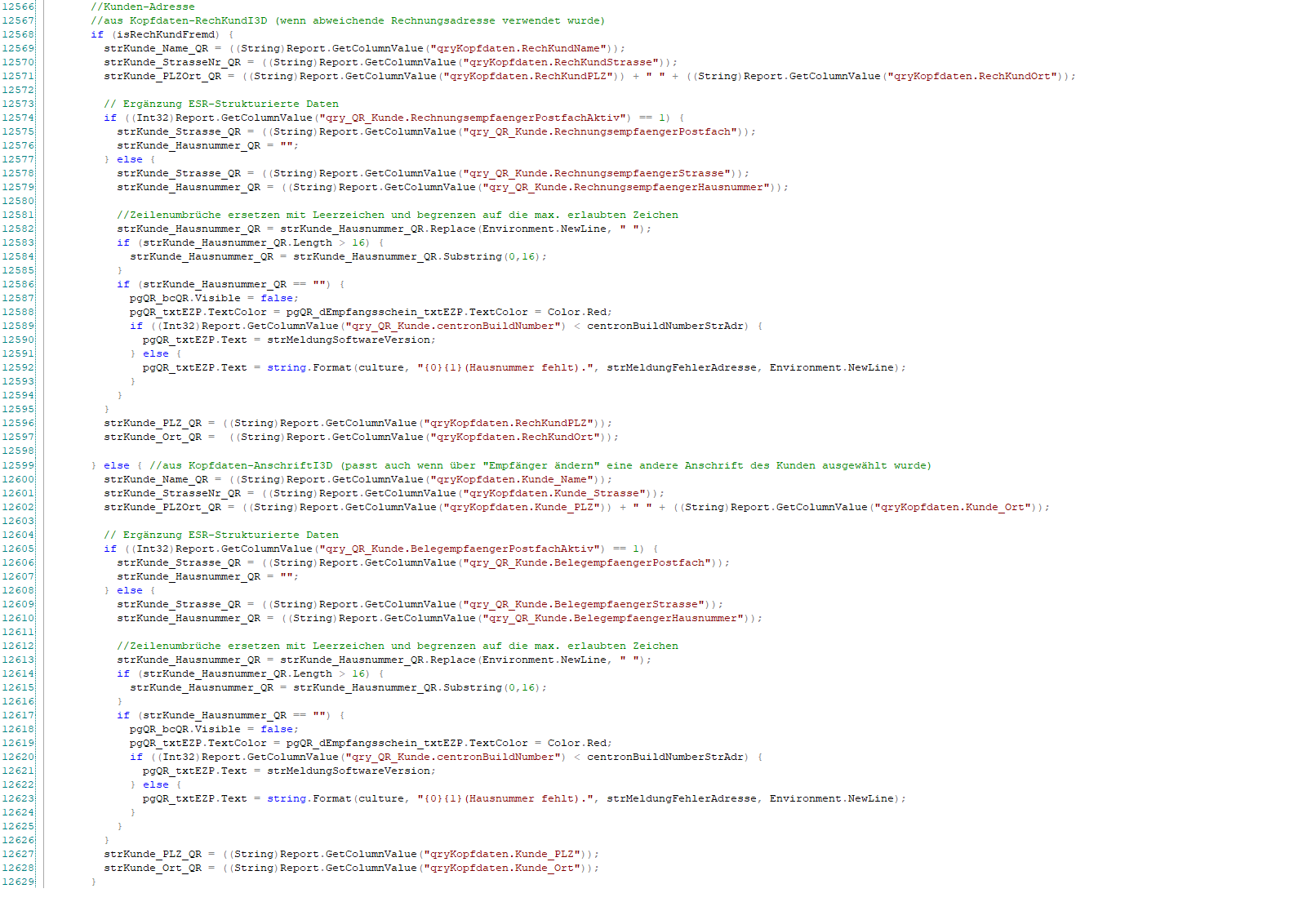
Immediately afterwards, the following is also inserted directly after the IF / ELSE:
      //Zeilenumbrüche ersetzen mit Leerzeichen und begrenzen auf die max. erlaubte Zeichen
      strKunde_Strasse_QR = strKunde_Strasse_QR.Replace(Environment.NewLine, " ");
      if (strKunde_Strasse_QR.Length > 70) {
        strKunde_Strasse_QR = strKunde_Strasse_QR.Substring(0,70);
      }
      strKunde_PLZ_QR = strKunde_PLZ_QR.Replace(Environment.NewLine, " ");
      if (strKunde_PLZ_QR.Length > 16) {
        strKunde_PLZ_QR = strKunde_PLZ_QR.Substring(0,16);
      }
      strKunde_Ort_QR = strKunde_Ort_QR.Replace(Environment.NewLine, " ");
      if (strKunde_Ort_QR.Length > 35) {
        strKunde_Ort_QR = strKunde_Ort_QR.Substring(0,35);
      }

      if ( (strKunde_Strasse_QR == "") || (strKunde_PLZ_QR == "") || (strKunde_Ort_QR == "") ) {
        pgQR_bcQR.Visible = false;
        pgQR_txtEZP.TextColor = pgQR_dEmpfangsschein_txtEZP.TextColor = Color.Red;
        if ((Int32)Report.GetColumnValue("qry_QR_Kunde.centronBuildNumber") < centronBuildNumberStrAdr) {
          pgQR_txtEZP.Text = strMeldungSoftwareVersion;
        } else {
          pgQR_txtEZP.Text = string.Format(culture, "{0}{1}.", strMeldungFehlerAdresse, Environment.NewLine);
        }
      }
QR CODE ADJUSTMENTS
Once all necessary code changes have been made, the QR code itself must now be adapted to the new structured address specifications.
In the report, switch to the page pgQRYou can find these in the lower tabs of the report designer.
On this page, you will find several text fields that are responsible for outputting the QR invoice.
In these text fields, the previous variables must be replaced by the newly created variables (street, house number, postal code, city).

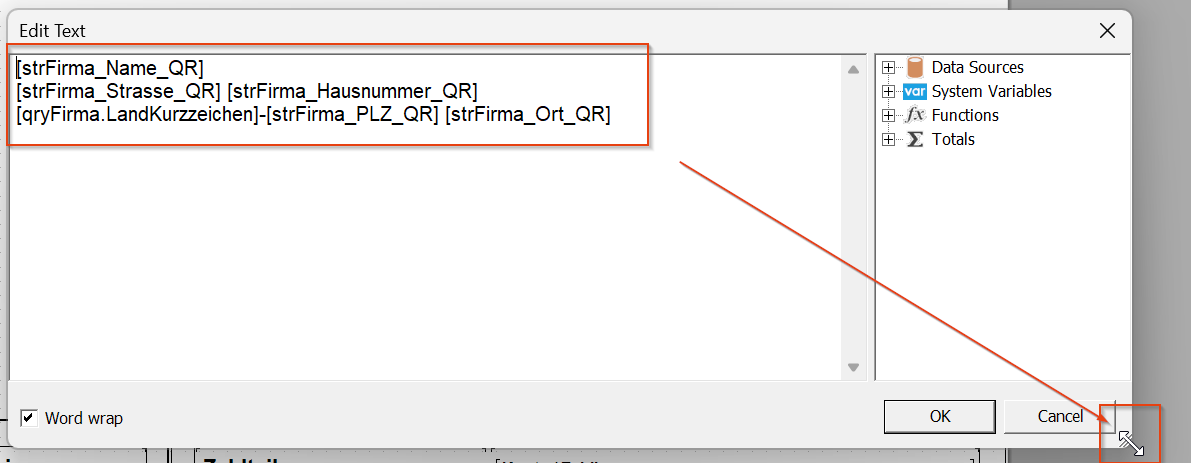
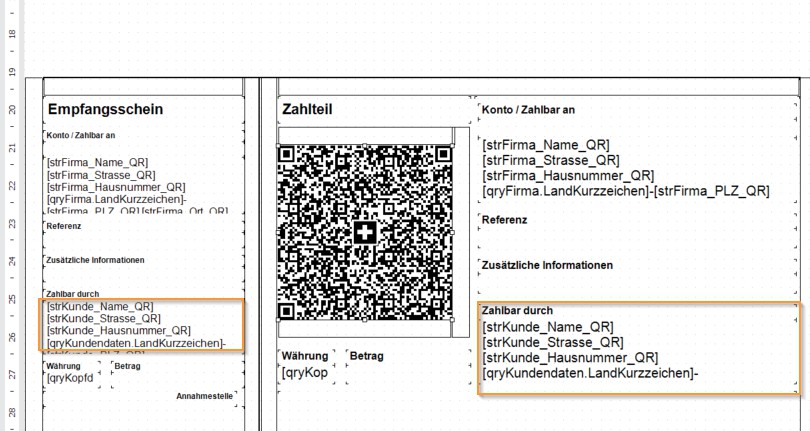
You will find two text fields containing data for "Account / Payable to," as outlined in yellow here.
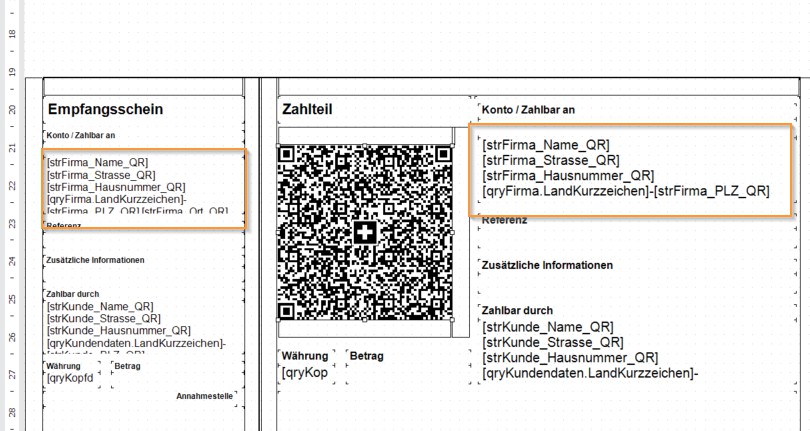
Open these text fields by double-clicking and insert the following text:
Pay particular attention to ensuring that the data is formatted consistently.

In our tests, we found that copying the text sometimes caused the data to shift within the lines. Therefore, please check carefully to ensure that the specified format is fully adhered to.
The display should look like the example below. If necessary, it is advisable to enlarge the text field slightly by dragging it to improve the overview.
The same process is repeated in the text fields for "Payable by":
The next step is to adapt the content of the QR code to the new specifications. To do this, a prepared text module is stored, which can be found here:
Be sure to pay attention to the exact formatting:
All blank lines must be transferred correctly.
After the entry EPD is imperative insert a line break.
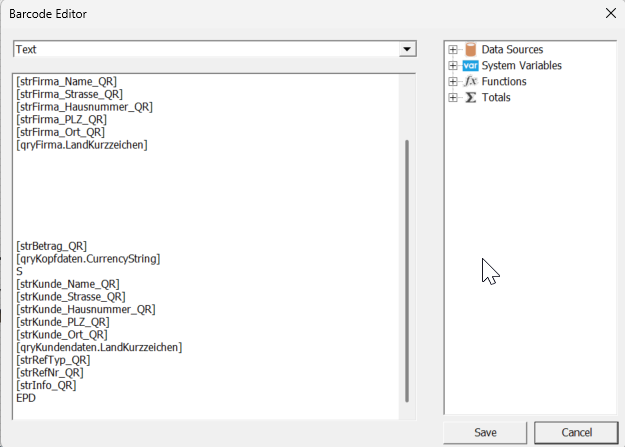
The blank lines are necessary for the correct validation and generation of the QR code.
Saving the report
SAVE REPORT
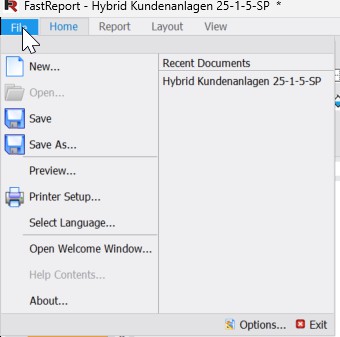
Once all adjustments have been made, please save the report:
Go to the menu File → Save.
When closing the report, you may be asked whether you want to save the changes. Please confirm this as well with Yes.
This means that all changes to the report have been successfully applied and the QR code complies with the new Swiss requirements.
VALIDATION
Once you have finished making adjustments to the report and QR code, be sure to test the implementation. To do so, proceed as follows:
Generate a new invoice.
Important: The invoice must be created using the current c-entron version v2.0.2509.x or higher.
Alternatively, you can run the inspector in advance. For more information, please refer to the following link: https://hilfe.c-entron.de/de/systemhaus-erp/Working-version/strukturierte-adressfelder
Once the invoice has been generated, you can check the payment slip using the official online validator: https://swiss-qr-invoice.org/validator/?lang=de
Upload or scan the generated QR payment slip.
Ensure that all address data is displayed correctly in a structured format.
The validator immediately shows you whether the QR code complies with legal requirements.
Alternatively, you can simply scan the QR payment slip using your own banking app and receive immediate confirmation.
SUMMARY AND OUTLOOK
By following the steps described in this white paper, you have successfully adapted your report to the new legal requirements for structured address representation in Swiss QR invoices. This means you are well prepared for the changeover on November 21, 2025.
If you encounter any uncertainties or difficulties during implementation, please contact our organization.